

Jeff Kushmerek, CEO of Infinite Renewals, has spent more than 20 years leading and scaling post-sale organizations. On a recent GUIDEcx webinar, he told us about a trip he took about 15 years ago to meet the Lowe’s e-commerce team. The first item on the plan was routine: load their product data into the new system and run a quick cleansing pass.
The Lowe’s team pushed back. They had already paid a lot of money for a cleansing project, and their data was, in their words, super clean.
Then Jeff’s team loaded it, and the problems showed up on screen right away. The word “snowblower” appeared 11 different ways: in all caps, in camel case, as one word, and as two.
Each version looked harmless on its own. The system, though, read them as 11 different products, which threw off search and reporting and everything that depended on them. As Jeff put it, “it just spirals down from there.”
If you run client onboarding, you’ve probably had your own snowblower moment, when a customer swears their spreadsheet is ready and then the import fails on row 14.
The practices that came out of that project still hold up. Assume the data isn’t clean, load it early, let AI handle the mechanical cleanup, keep every record, and send the exceptions back to your customer so you learn why they exist.
Click Here to watch the full webinar.
What is data ingestion in customer onboarding?
Data ingestion is the step where you take everything your new customer already has (users, accounts, products, locations, historical records) and bring it into your platform so they can actually use it.
Jeff admits it’s “probably not the sexiest subject,” but configuration, training, reporting, and go-live all depend on it. Nobody notices ingestion when it works. When it doesn’t, you get a stalled project and an onboarding manager rebuilding a CSV at 9 p.m.
Data ingestion best practices for customer onboarding
1. Assume “clean” data isn’t clean yet
Lowe’s wasn’t wrong that their data worked, since shoppers could still find snowblowers. Data can work fine inside a customer’s own systems, where people have learned to work around its quirks, and still fail as soon as it lands in yours. Eleven spellings of one product become a problem the first time you need to match, dedupe, or report on them.
So when a customer says their data is ready, believe that they believe it, and plan for cleanup anyway. Build a cleansing step into every project timeline and mention it at kickoff, so it never feels like a surprise or a criticism. That buffer is cheap insurance.
2. Run the data in first, so you can see everything
On day one at Lowe’s, before any configuration, Jeff’s team loaded the customer’s data into their system. Once it was in, “you’d see everything.” The snowblower problem couldn’t be seen in the customer’s own files, but it was obvious the moment the data hit the new system.
Don’t wait until configuration is finished to try an import. Run a test load with a real export, not a sample file someone tidied up for you, while there’s still room in the timeline to fix what it turns up.
That’s hard to do when the project itself lives in a spreadsheet. In GUIDEcx’s discovery conversations with onboarding teams, 78% said they’re still running implementations on spreadsheets, sometimes for multimillion-dollar projects. A spreadsheet will hold 10,000 rows of product data without complaint, but it won’t tell you that 11 of them are the same snowblower.
3. Let AI do the reading, mapping, validating, and cleaning
At Lowe’s, fixing 11 snowblowers meant writing custom code and hoping it caught everything. “I would trust AI’s code these days a lot more than what I was writing back in the day,” Jeff said.
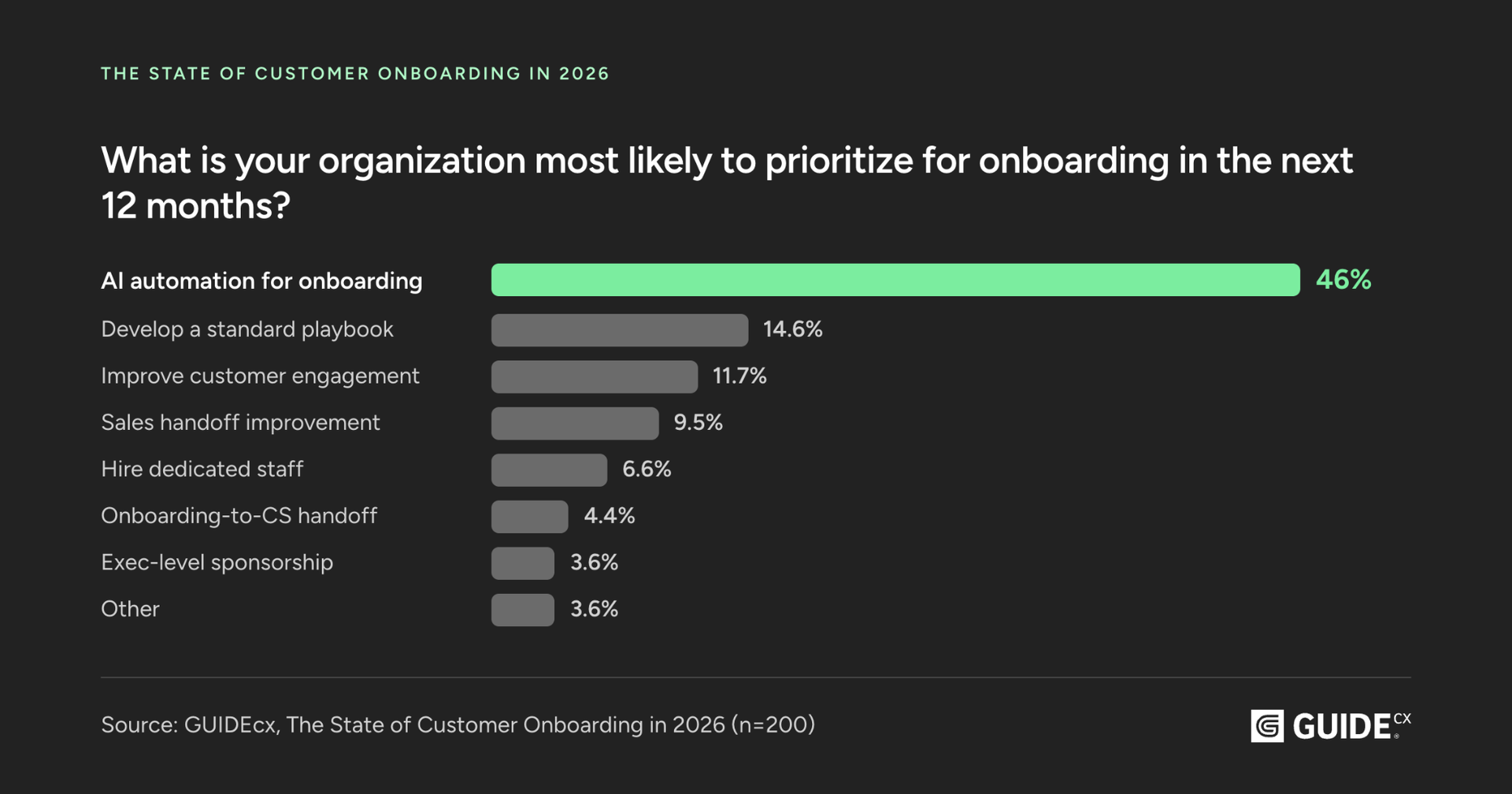
Onboarding teams want that help. In GUIDEcx’s State of Customer Onboarding in 2026 report, a survey of 200 onboarding professionals across 18 industries, 46% said AI automation is their top priority for the next 12 months.
Ingestion is one of the most practical places to start, because the work is repetitive, follows rules, and is easy to check. AI can:
- Read: recognize fields, records, relationships, and formats, even in a messy file.
- Map: match customer data to the right fields in your destination system, so “Acct Name,” “Company,” and “Customer” all land in the same place.
- Validate: check completeness, formatting, and required values before the import, not after it breaks.
- Clean: standardize entries, find duplicates, and flag anomalies. This is where 11 snowblowers become one.

AI works best against a clear target, so agree on naming conventions, required fields, and formats up front. Otherwise you’re just automating the mess faster. For the tooling side, here’s how teams are connecting AI agents to onboarding projects with MCP and the GUIDEcx API, and an overview of GUIDEcx’s AI features for onboarding.
4. Don’t throw stuff away
Jeff was most emphatic about this one. When a record doesn’t fit, it’s tempting to drop it and keep the import moving. Don’t.
That odd row might be a legacy contract, a regional exception, or the one account your customer’s CFO cares about most. Quarantine it, tag it, and keep going. You can delete a quarantined record later, but a record you dropped mid-import may not exist anywhere else once the customer shuts off the legacy system. Hold AI to the same limit: let it standardize and flag, but don’t let it quietly decide what your customer doesn’t need.
5. Send the exceptions back to your customer
A lot of onboarding teams hesitate here. They worry that questions about strange data will look like nitpicking or, worse, make them look like they don’t know what they’re doing.
Jeff’s experience says the opposite. “They’re not going to be upset,” he said. “They’re going to appreciate that you asked them that question.”
A few ways to make those conversations easy:
- Batch your questions. Send one tidy list of exceptions instead of 10 separate pings.
- Show the evidence. “We found 11 variations of this product name” lands better than “your data has issues.”
- Suggest a fix. Offer a default, like “we’ll standardize these to ‘Snowblower’ unless you’d prefer otherwise,” so a quick yes keeps things moving.
- Keep it in one place. In those same GUIDEcx discovery conversations, 96% of teams described manual chasing as a primary time-drain. A customer-facing onboarding portal keeps every file and answer with the project instead of scattered across inboxes.
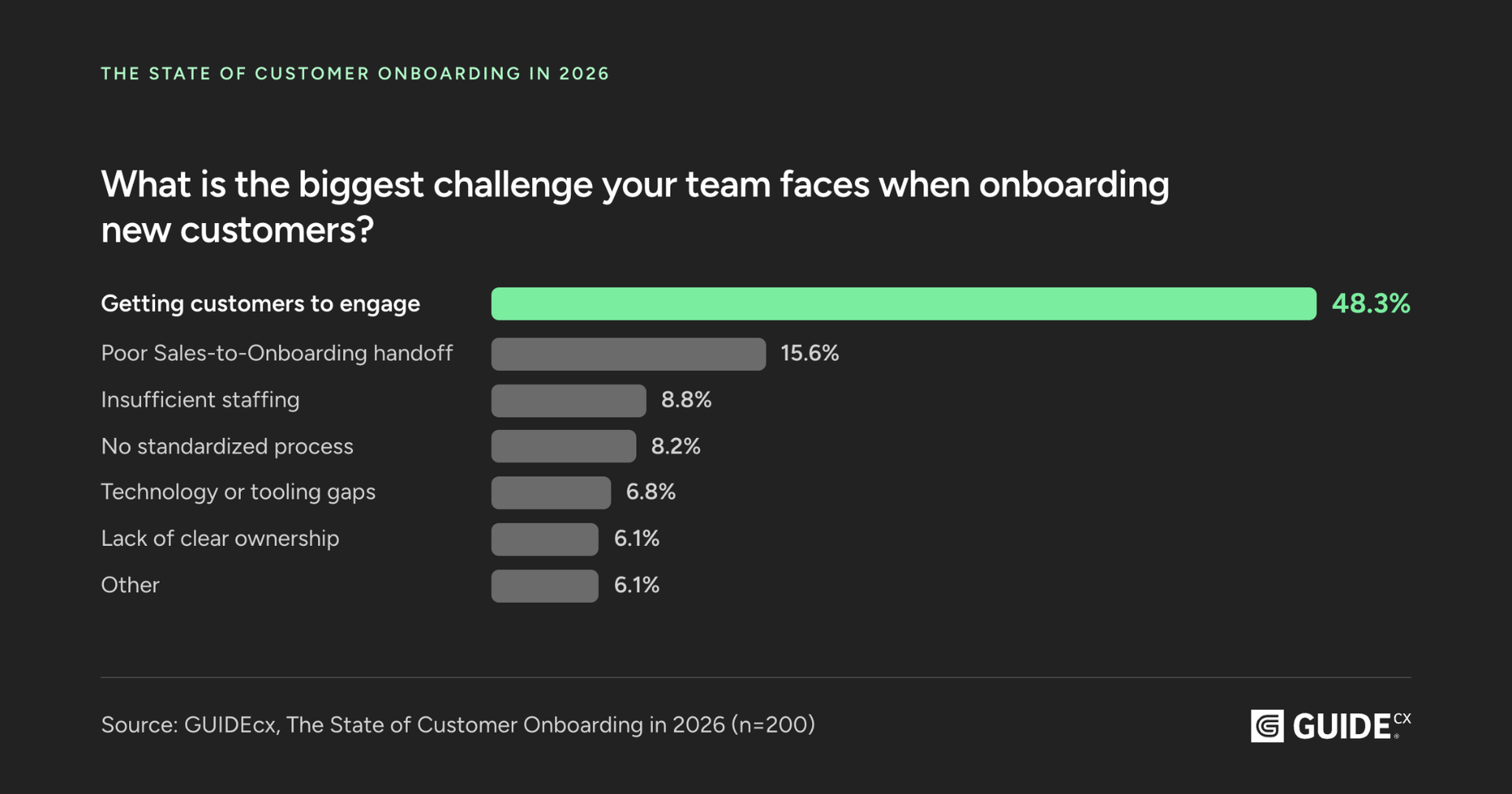
These questions also help with engagement, which is a bigger problem than most teams admit. GUIDEcx’s 2026 report found that 48% of onboarding teams say keeping customers engaged is their biggest challenge. A specific question about their own data gives the customer a reason to log in and a decision that only they can make.
6. Get the why, then turn it into a rule
When you ask, Jeff says, “They’re going to tell you why, and knowing the answer to the why is usually what you need to get it into your system.”
The 11 snowblowers might have been typos, or they might have meant that different teams entered products in different seasons. A duplicate account might be a data-entry mistake, or it might be two subsidiaries that bill separately. AI can flag either anomaly, but only your customer can tell you which one it is.
Write the answer down as a mapping rule, for example, “subsidiaries with separate billing stay as separate accounts.” Then the next import, and the next customer with a similar structure, won’t raise the same question.
A quick data ingestion checklist
Keep this handy for your next implementation:
- Add a data cleansing step to the project plan and mention it at kickoff
- Agree on naming conventions, required fields, and formats before the first import
- Collect customer files in one shared place, not over email
- Run a test load with real data early in the project
- Use AI to read, map, validate, and clean the data
- Quarantine and tag records that don’t fit; never delete them on the spot
- Send one batched list of exceptions to the customer, with suggested fixes
- Record the why behind each exception as a mapping rule
- Validate everything again before go-live
The bottom line
Since Jeff’s team found 11 snowblowers at Lowe’s, AI has cut cleanup that once took custom code and a lot of hope down to minutes. The practices around it still hold: bring the data in early, keep every record, and when something looks off, ask your customer why.
Do that, and cleanup happens early, when it’s cheap, instead of the week before go-live. The customer also spends the project answering real questions about their own business, which keeps them more engaged than another status email would. For more on taking the busywork out of implementations, read how to reduce manual work in customer onboarding, or get the full State of Customer Onboarding in 2026 report to see how 200 onboarding pros are approaching AI this year.
To see how this works in GUIDEcx, book a custom demo.
FAQ
What are the best practices for data ingestion?
Assume the incoming data needs cleanup, load it into your system early to see the problems, use AI to read, map, validate, and clean it, keep every record, and ask the customer about exceptions so you understand why they exist.
What is the difference between data ingestion and data migration?
Data migration is the whole project of moving data from one system to another. Data ingestion is the part where data is brought into the new system. In customer onboarding, the two terms are often used interchangeably.
Can AI help with data ingestion?
Yes. AI can recognize fields and formats, map data to your system, check for missing or badly formatted values, standardize entries, and flag duplicates or anomalies. It works best with clear standards to enforce and a person who confirms the exceptions with the customer.
Should you delete bad records during data ingestion?
Not right away. Quarantine and tag records that don’t fit, then ask the customer about them. Many “bad” records turn out to be legitimate exceptions with a business reason behind them.
How do you keep data ingestion from delaying onboarding?
Plan a cleansing step from day one, run a test load early, collect files in one place instead of email, and send customers batched exception questions with a suggested fix.

- Data Ingestion Best Practices for Customer Onboarding: Lessons From 11 Snowblowers – November 12, 2026
- How to Build an Asynchronous Customer Onboarding Process Customers Actually Finish – October 22, 2026
- How to Manage Multiple Stakeholders During Customer Onboarding – September 22, 2026
