


What is Customer Onboarding Software?
Customer onboarding software is a platform that helps businesses manage and automate the process of bringing new customers from purchase through implementation, go-live, and adoption. It gives internal teams and customers a shared place to manage onboarding projects, tasks, timelines, communication, documents, approvals, and progress. For companies with complex implementations, customer onboarding software can reduce manual project management, improve customer engagement, and help customers reach value faster.
Modern customer onboarding platforms increasingly use AI to help teams identify project risk earlier, recommend next steps, improve forecasting, and surface insights across an entire portfolio of implementations. GUIDEcx is purpose-built for complex B2B customer onboarding, combining project execution, customer engagement, automation, AI-driven intelligence, and portfolio visibility in one platform so teams can run more predictable implementations and improve time-to-value.
Introduction
A bad onboarding experience is the biggest driver of churn in the entire customer journey.
And it can happen early. Our State of Customer Onboarding in 2026 report, based on a survey of hundreds of customer onboarding professionals, found that 62% of B2B companies have had a customer churn early due to a poor onboarding experience.
One of our customers called this “inception churn.” He said it was their biggest challenge. He also said it was their most controllable.
A good onboarding experience usually gets customers to value faster than a bad one. But when it doesn’t, the process is meaningfully engaging and transparent, resulting in shared trust. Trust gives you leverage to overcome unexpected hiccups that delay your customers from seeing first value.
Implementation teams across B2B SaaS are realizing in 2026 that spreadsheets, generic project management software, and email threads can no longer support engaging, transparent customer experiences—particularly when they have a high volume of onboarding projects. They’re now turning to platforms purpose-built for it.
If you’re in the same boat, the slate of market offerings might be a little daunting. We created this report to help you narrow your search.
Here’s what you’ll find below:
- Our goal in creating this report and how we made our decisions
- The market landscape and tips on evaluating the right platform for your business
- Real pain points and the features that help
- Our rankings for the best customer onboarding software of 2026
Try Our Interactive Tool to Get a Customer Onboarding Software Recommendation Just for You
If you’d rather just cut to the chase, we hear you. We built an interactive tool that asks you about your customer onboarding process, and provides a recommendation just for your company. Try it out below.
Our Goal and Approach to Ranking SaaS Onboarding Tools
We’ve seen a few reports like this one. We hope you check the others out.
To create as useful a guide as possible, we spent weeks researching and evaluating the entire market. It was really important to us that what we published was actually useful. We held close the things that were top of mind for you by analyzing all of our conversations from the last year with implementation teams (hundreds of them) to ensure we deeply understood the challenges they face and the solutions they sought.
Our evaluation criteria came down to a simple, intuitive framework: what platforms align best with real pain points that we’ve heard from real customers (including ones who didn’t buy GUIDEcx)?
So, whether you decide to give GUIDEcx a closer look or you choose a platform better suited to your needs, our goal is to help you make the right choice for your team.
Note: Though our research was primarily conducted in January through March of 2026, we’ve updated this report as of July 2, 2026.
What Features Should I Look for in a Client Onboarding Software?
The customer onboarding category is getting big. By our count, there are now over 40 players in the market. In general, the market as a whole tends to fall into three buckets:
- Digital Adoption Platforms – these primarily help users learn the software while they’re already inside it, with a hands-off approach to onboarding users.
- Customer Onboarding Platforms – built for implementations that are high-touch and have some layers of complexity, requiring project transparency and tight communication.
- Customer Success Platforms – dedicated to retaining customers after the sale, typically with some capabilities to support onboarding but not focused on it.
If you’re not sure which type of platform your organization needs, check out this breakdown of SaaS onboarding software, or this might help to get your bearings:
- Digital Adoption Platforms are all about Product-led Growth (PLG). If your product is subscription-based and relatively low-cost, and your users can orient themselves with tooltips, interactive walkthroughs, and simple checklists, start your search here.
- Customer Onboarding Platforms are designed for implementations that require strong collaboration and accountability from internal and external stakeholders to complete tasks and configure integrations. If your onboarding process takes weeks or months, start here.
- Customer Success Platforms focus on the steps required to renew and expand customers after the sale. If you are focused on customer health 6-12 months after the sale or beyond, start here.
Overview of the Customer Onboarding Software Landscape
Need to understand your options for customer onboarding software in a nutshell? We visualized the market for you.
As you can see, the market is pretty specialized in a few areas. Click around to see which tools specialize in what.
When Choosing Customer Onboarding Software, What Features Matter Most?
We talk to implementation teams every day. After analyzing hundreds of these conversations over the last year, we captured what we heard as the 7 most prevalent pain points facing these teams today.
- Chasing customers for information
- Manual data collection & inefficient workflows
- Inception churn
- Disparate, siloed tools
- Lack of macro-level visibility
- Inability to scale without headcount
- Lack of internal and external accountability
Any sound familiar? If not, maybe these quotes from real implementation leaders we talked to do:
“Right now, I literally have to review every single one of my team’s projects and open them up, review their notes, their emails, and figure it out… it’s a bit of a pain.” – VP of Client Services and Success
“It’s all of us chasing [customers] via text, phone call, and email, trying to get them engaged. And it’s really time-consuming.” – Director of Sales
“Our onboarding is our biggest bottleneck… there’s just not enough bandwidth to support if we had 10 or 15 groups come at the same time.” – CXO
Solving for these pain points is what’s required of a modern, professional onboarding solution. The platforms currently available have rolled out the features below to serve the market:
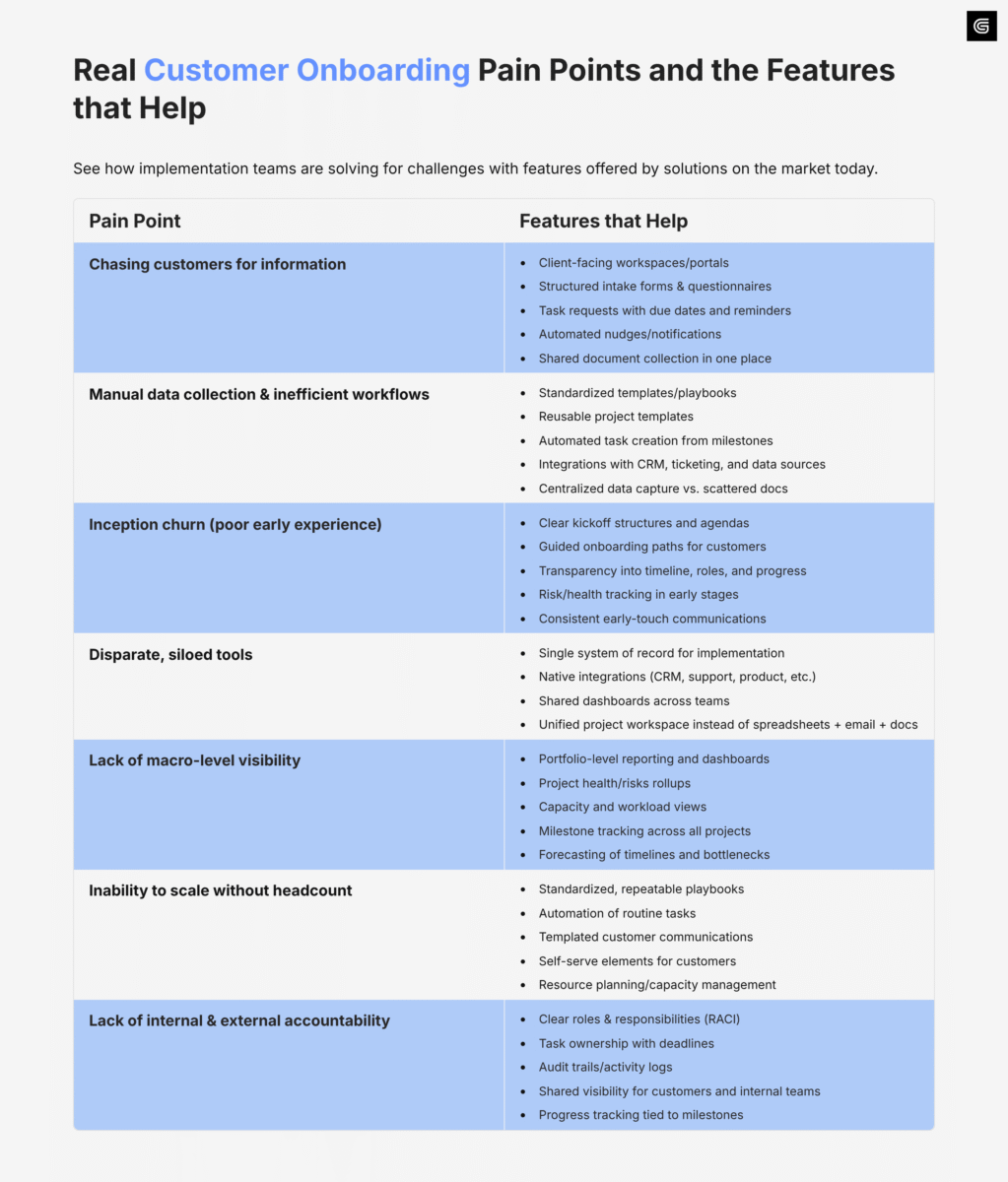
But not every platform on the market does all of these things at once. Most platforms specialize.
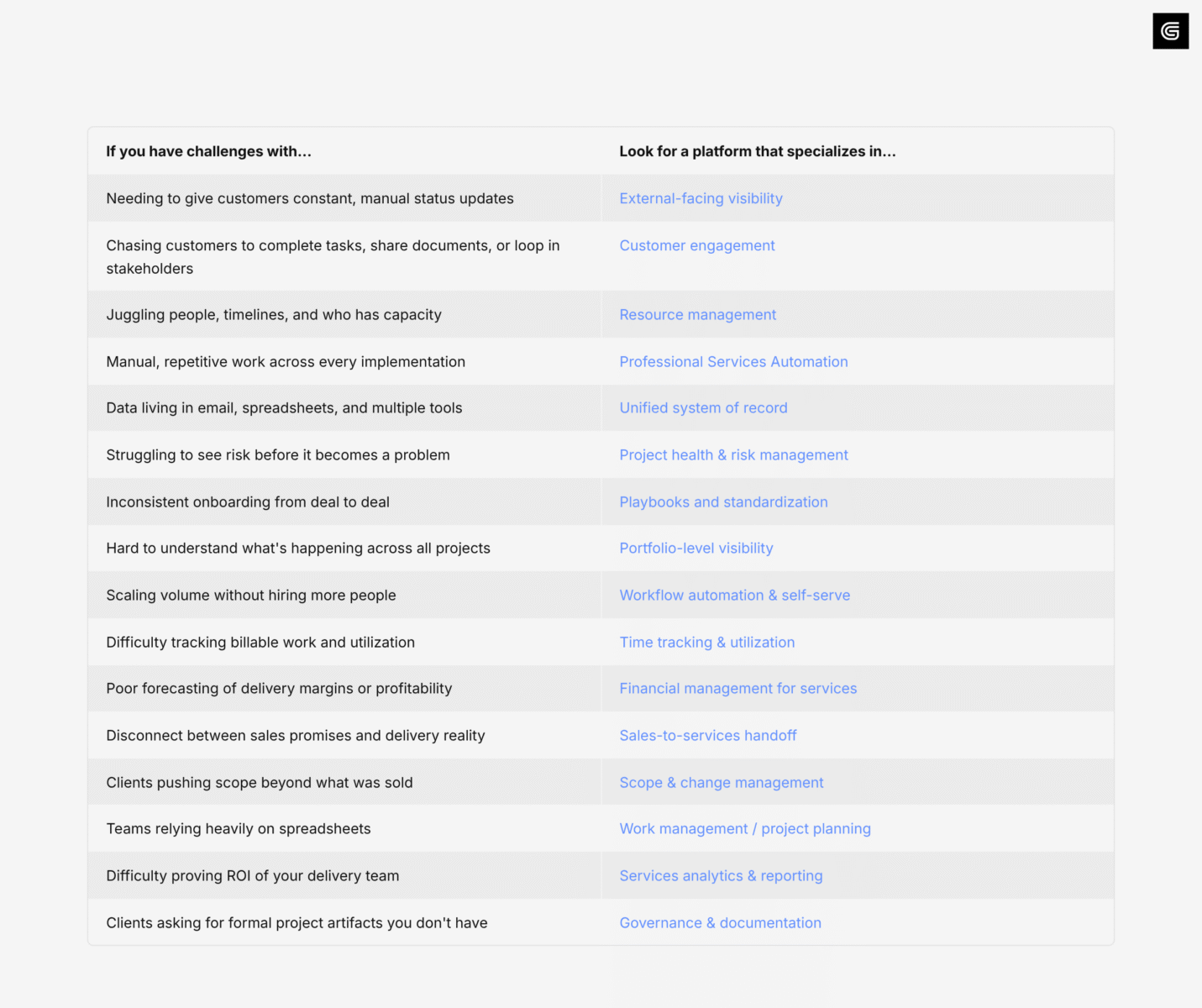
Quick preview for later – GUIDEcx, for example, specializes in supporting teams who have highly collaborative implementations and need strong external-facing visibility and customer engagement capabilities. Tools like Pendo, on the other hand, specialize in user onboarding that doesn’t require as much hands-on collaboration between stakeholders.
So, to help you evaluate the platform that best fits your needs, you should reflect on your most painful challenges and research the solutions that specialize in features aimed at that challenge.
Check out this breakdown that should help:
What is the best customer onboarding software?
Okay, now you have your bearings. Let’s dig into our evaluations.
We’ve ranked the 10 best Customer Onboarding tools for 2026 based on real pain points we’ve heard the most from leaders in onboarding and implementation.
Let’s start at the top:
#1. GUIDEcx—Top Customer Onboarding Software for Keeping Customers Engaged
- Specializes in: External-facing visibility, Customer Engagement, Project Health & Risk Management, Portfolio-Level Visibility
- Best for: Teams with a high velocity of onboarding projects requiring close collaboration between internal and external stakeholders.
- G2 Rating: 4.6/5
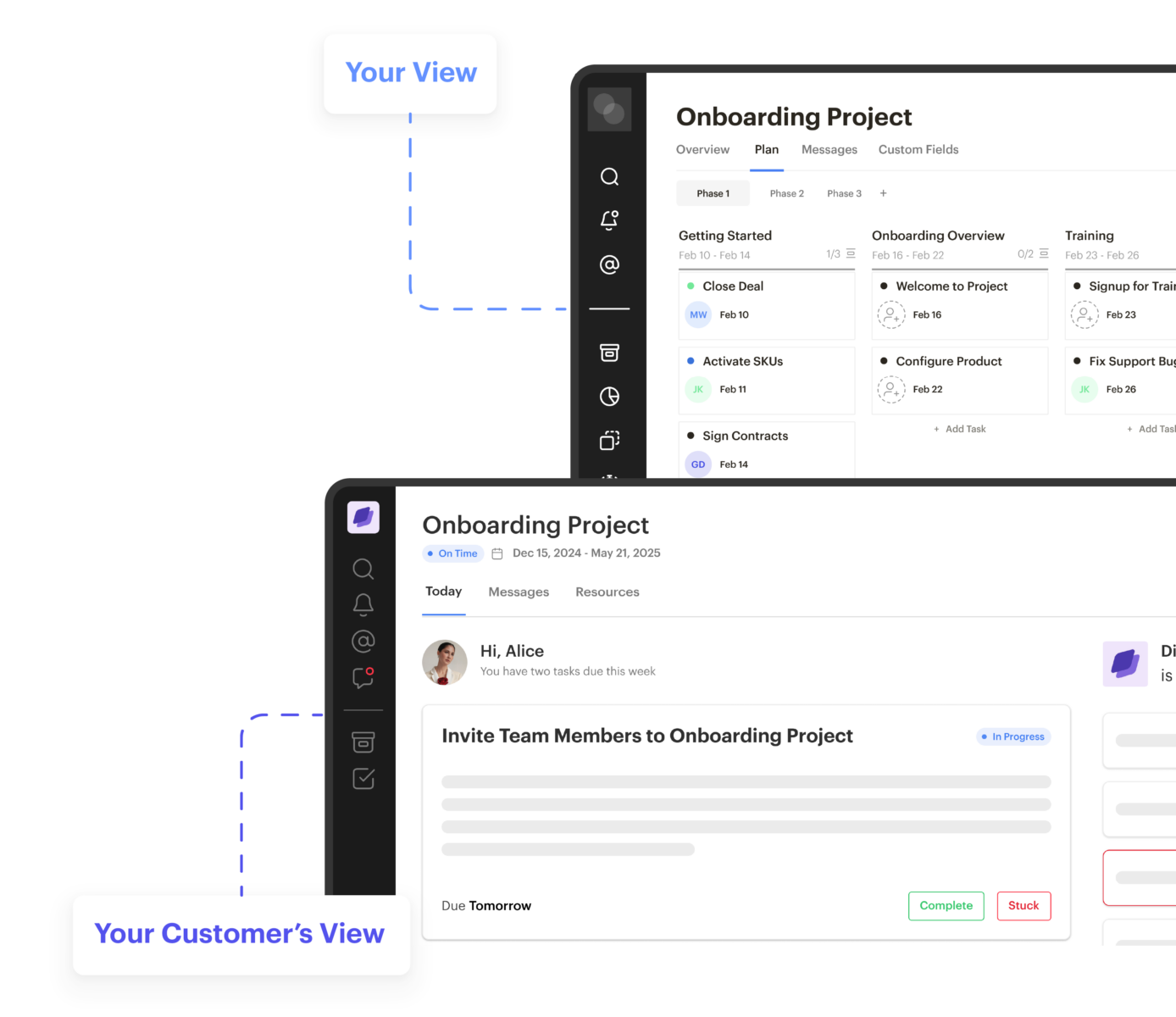
GUIDEcx is a purpose-built customer onboarding and project management platform designed for teams that run complex, high-touch implementations.
Unlike generic project management tools, GUIDEcx is built around the idea that onboarding is a collaborative, customer-facing process, not an internal delivery workflow. The platform provides a shared workspace where implementation teams and their customers can see timelines, milestones, risks, and responsibilities in one place, reducing back-and-forth over email and spreadsheets.
Where GUIDEcx stands out is its focus on visibility, engagement, and repeatability. Teams can standardize their onboarding processes through dynamic project templates, automate routine tasks, and maintain real-time transparency with customers throughout their implementations.
Leaders also gain portfolio-level visibility into project health and resource capacity, with AI agents continuously monitoring every project for emerging risks and recommending mitigation plans informed by best practices from high-performing onboarding teams. For organizations that prioritize strong early customer experiences and predictable delivery, GUIDEcx is a strong fit.
How GUIDEcx’s API Differs from Other Platforms on the Market
If you’re interested in using onboarding data for executive reporting, BI, or AI agents, GUIDEcx’s Analytics API is an important capability to look at closely. GUIDEcx combines a traditional operational API with a dedicated Analytics API. That means teams can still automate things like creating projects or updating records, but they can also query larger onboarding datasets, filter them, and calculate metrics before the data is returned. In plain terms, more of the heavy lifting happens inside GUIDEcx instead of forcing your BI tool, data team, or AI agent to pull thousands of raw records and piece the answer together afterward.
Rocketlane’s API is more traditional REST, where data is generally retrieved by resource, such as projects or tasks, and analyzed downstream. A simple way to think about it is
miles per gallon: both can get you where you need to go, but GUIDEcx’s Analytics API can use fewer requests and less downstream processing for portfolio-level reporting and AI use cases.
What are the key features of GUIDEcx?
- Customer-facing workspace: A shared, branded hub where customers and your team collaborate and complete tasks with clear visibility into progress, tasks, and documents.
- Dynamic project templates: Reusable onboarding workflows that automatically adapt to customer complexity, timeline, and risk.
- AI-powered project risk and health tracking: Real-time signals across the entire project portfolio that surface issues early so teams can intervene before projects go off track.
- Intelligent project forecasts: Data-driven, real-time forecasts for project end dates that adjust with real project data and help teams anticipate timelines, bottlenecks, and delivery outcomes.
- Powerful customer engagement: Built-in tools that keep customers active, accountable, and aligned throughout onboarding, including a global inbox for all customer communications and branded automated emails.
- MCP-optimized Analytics API: A developer-ready API built for AI agent compatibility, giving your tools and workflows real-time access to project health data without manual exports or custom middleware.
| Pros | Cons |
|---|---|
| Superior customer engagement | Not ideal for very small teams |
| Excellent visibility into project health, with AI-powered insights | Less focused on time tracking than PSA tools |
| Unique flexibility to integrate with existing systems | |
| Unparalleled foresight into upcoming risks |
#2: Rocketlane – Top Platform for Services Operations
- Specializes in: Services Operations, Resource Management, Time Tracking, Billing/Financial Ops
- Best for: Professional services and implementation orgs that need to run delivery like an operation—capacity, time, billing, and customer-facing execution in one system.
- G2 Rating: 4.7/5
Rocketlane is a service delivery platform built to help services teams manage the operational side of implementations, like resourcing, time/expense tracking, and billing.
While some onboarding platforms prioritize customer transparency, Rocketlane leans into the services operations layer: who’s staffed, how time is tracked, and how delivery maps to invoices and margins.
Where Rocketlane stands out is in connecting customer-facing delivery to back-office services execution, giving teams a single place to coordinate projects, capture effort, and run predictable services delivery at scale. Services organizations that need to closely track capacity and resourcing will find Rocketlane to be a fit. Teams requiring more custom experiences in their onboarding process would benefit from evaluating other platforms like GUIDEcx or Totango.
If Rocketlane is on your shortlist, we’ve put together a deeper comparison of the two platforms, including differences in customer onboarding, professional services, AI, resource management, and integrations.
Read our GUIDEcx vs. Rocketlane comparison.
Key Features of Rocketlane:
- Resource management: Plan capacity, staffing, and workload across delivery teams.
- Time & expense tracking: Capture effort cleanly for internal reporting and billing workflows.
- Billing/invoicing support: Link delivery effort to billing models and invoice operations.
- Customer collaboration layer: Provide customers structured visibility into milestones, tasks, and updates.
- Delivery reporting: Visibility into delivery performance, utilization, and project execution.
| Pros | Cons |
|---|---|
| Services operations orientation for services orgs | More “services ops” than “customer onboarding experience” in its core design |
| Useful blend of internal ops + external delivery experience | Requires thoughtful setup to get full PSA value |
| Users frequently highlight the ease of use in entering time on projects. | Limited flexibility to customize customer experiences |
Rocketlane customer review:
“What I really like about Rocketlane is the scope of features it offers…in one place.”
– G2 Reviewer
#3: Dock – Top Platform for Lightweight Client Portals and Shared Workspaces
- Specializes in: Client Portals, Customer Collaboration, Shared Checklists, Document Hubs, Success Plans
- Best for: Teams that want a simple, customer-friendly way to organize onboarding deliverables, timelines, and shared assets.
- G2 Rating: 4.7/5
Dock is a client-facing workspace tool that helps teams create clean, structured portals for onboarding, implementation, and ongoing client collaboration. The tool is positioned as “AI Revenue Enablement,” with features including a digital sales room, templated workspaces for onboarding,
Unlike full-scale PSA or onboarding orchestration platforms, Dock prioritizes ease of use, visual clarity, and quick setup, making it easy for customers to understand what’s happening without training. The platform centralizes tasks, files, and plans so teams can reduce email back-and-forth.
Where Dock stands out is speed and simplicity. Teams can stand up shared workspaces quickly, keep customers focused on the next step, and centralize docs, checklists, and plans without heavy operational overhead. For teams with standardized and relatively simple onboarding processes, Dock may be a strong fit. If your onboarding is more “high-touch,” we’d recommend a platform that’s built for complexity and flexibility.
Key Features of Dock:
- Client-facing workspaces: Shared spaces for plans, tasks, and collateral.
- Checklists & task coordination: Clear “who owes what by when.”
- Document hub: Keep onboarding assets in one place.
- Templates: Reusable workspace layouts for repeatability.
| Pros | Cons |
|---|---|
| Strong engagement analytics to gauge customer participation | Less depth in portfolio visibility / forecasting than implementation-native platforms |
| Easy to deploy and customer-friendly | Limited customization |
| Strong for organizing shared client work | Limited integrations |
Dock customer review:
“Dock is easy to use and intuitive for both our internal team and clients. The built-in chat support is a standout and is accessible, responsive, and genuinely helpful…”
– G2 Reviewer
#4: Precursive – Top Platform for Salesforce-Native PSA and Delivery Operations
- Specializes in: PSA, Resource Planning, Forecasting, Salesforce-Native Delivery, Services Reporting
- Best for: Services orgs that run on Salesforce and want PSA + delivery planning inside their CRM.
- G2 Rating: 4.2/5
Precursive is a Salesforce-native professional services automation platform built for services teams that want forecasting, resourcing, and delivery operations tightly connected to CRM data.
Unlike standalone tools, Precursive embeds services planning, staffing, and forecasting directly into Salesforce, reducing the need for separate systems of record. This makes it especially useful for teams that run the bulk of their operations out of Salesforce.
It’s a strong fit when Salesforce is the system of record and you want services delivery—staffing, timelines, and reporting—to live in the same ecosystem. Teams that either don’t use Salesforce or don’t live in it every day but need strong visibility into their project portfolio should explore options like GUIDEcx, Rocketlane, or OnRamp.
Key Features of Presursive:
- Salesforce-native PSA: Delivery operations tied directly to CRM context.
- Resource planning: Skills/capacity planning for services teams.
- Forecasting & reporting: Services delivery visibility once configured.
- Templates: Standardize delivery processes.
| Pros | Cons |
|---|---|
| Strong fit for Salesforce-centric teams | Less customer-facing experience than onboarding-first platforms |
| Good operational visibility for delivery leaders | Can require tight configuration to match your workflow |
| Promotes tight alignment between sales and services | Limited reporting |
Precursive customer review:
“Precursive is fully native to Salesforce…templates help us standardize delivery while reducing admin time.”
– G2 Reviewer
#5: OnRamp – Top Platform for Structured Client Onboarding and Portal-Driven Execution
- Specializes in: Client Onboarding, Client Portals, Standardization, Task Coordination, Internal/External Alignment
- Best for: Teams that need a structured, portal-led onboarding experience and want to reduce email-heavy coordination.
- G2 Rating: 4.4/5
OnRamp is a client onboarding platform designed to centralize onboarding steps, tasks, and customer-facing coordination in a single place.
Unlike broad project management tools, OnRamp focuses specifically on making onboarding easier to follow for both internal teams and customers through clear tasking and shared visibility. The platform helps reduce email-heavy coordination by keeping everything in one place.
Teams opt for OnRamp when they want a consistent process that customers can easily follow with clear tasks, shared visibility, and structured progress tracking without building a full PSA layer. Because OnRamp lacks a library of integrations outside of Hubspot or Salesforce connections, those needing unique or custom integrations with their existing stack may find GUIDEcx or Rocketlane a stronger option.
For a closer look at how the platforms differ, see our full GUIDEcx vs. OnRamp comparison, including customer experience, automation, AI, integrations, and implementation management.
Key Features of OnRamp:
- Client portals: Centralized onboarding experiences for customers.
- Task and milestone structure: Standard onboarding execution framework.
- Visibility into progress: Helps reduce manual status updates.
- Adaptive workflows: Built-in automation builder with conditional logic and triggered follow-ups.
- Milestone tracking: See each customer’s progress as they complete tasks and milestones.
| Pros | Cons |
|---|---|
| Clean, structured onboarding experience | Limited ability to reference billing and utilization |
| Reduces email clutter and manual follow-ups | Some teams may want more robust delivery reporting |
| Strong for repeatable, standardized project designs | Limited integrations |
OnRamp customer review:
“OnRamp simplifies complex data migrations with ease and precision.”
– G2 Reviewer
#6: Planhat – Top Platform for Tying Onboarding to Customer Health and Retention
- Specializes in: Customer Success, Health Scoring, Lifecycle Workflows, Account Insights, Reporting
- Best for: CS teams that want onboarding connected to adoption, renewals, and ongoing customer outcomes.
- G2 Rating: 4.5/5
Planhat is a customer success platform that helps teams manage onboarding as part of the broader customer lifecycle, with health scoring, analytics, and success workflows.
Unlike implementation-focused tools, Planhat treats onboarding as one phase of the broader customer lifecycle, helping teams understand how early experiences impact long-term success. The platform surfaces risk signals and engagement trends across the customer base.
It’s a strong choice when your priority is measuring onboarding success through adoption and long-term health signals, rather than just project completion. Teams treating onboarding as a distinct function in their business will favor some of the platforms on our list that are purpose-built for onboarding.
Key Features of Planhat:
- Customer health scoring: Track risk and engagement over time in your portfolio.
- Lifecycle workflows: Operationalize onboarding-to-renewal motions.
- Reporting: Strong insight into CS performance and customer trends.
- Time sheets: Power resource management and improve billing accuracy.
| Pros | Cons |
|---|---|
| Strong analytics and reporting | Less implementation-project-native than onboarding platforms |
| Time-tracking for teams needing resource management capabilities | Customer-facing collaboration varies by use case |
| Good for data-driven CS teams | Limited integrations |
| Deep customer health analytics for revenue forecasting |
Planhat customer review:
“Planhat consolidates data from multiple systems such as your CRM, Product Usage, Support, Billing and Analytics Tools into a single platform so that your team has a 360° view of each customer.”
– G2 Reviewer
#7: Gainsight – Top Platform for Enterprise Customer Success and Risk Management
- Specializes in: Customer Success Operations, Health Scoring, Renewals & Expansion, Executive Reporting
- Best for: Enterprise CS orgs that need sophisticated customer health modeling and scalable success processes.
- G2 Rating: 4.5/5
Gainsight is a widely adopted customer success platform built for large CS teams that need deep visibility into customer health, renewals risk, and expansion opportunities.
Unlike onboarding-specific tools, Gainsight is designed to support the full customer lifecycle, with sophisticated workflows, dashboards, and predictive insights. It centralizes customer data to inform decision-making across the organization.
It’s a common choice when onboarding is part of a broader success motion and you need enterprise-grade reporting, workflow orchestration, and stakeholder visibility across the customer base. Like with Planhat, if you care separate onboarding or implementation as its own function, you may be better served by a platform dedicated to onboarding.
Key Features of Gainsight:
- Health scoring & risk indicators: Operationalize churn prevention.
- Success playbooks: Standardize CS motions across teams.
- Dashboards & reporting: Executive visibility into customer performance.
- Customer Communities: Build a branded hub for your own customer community.
| Pros | Cons |
|---|---|
| Very strong enterprise capabilities | Heavier implementation and data readiness requirements |
| Deep reporting and analytics | Not purpose-built for implementation-project collaboration |
| Scales well across large organizations | High complexity of setup |
| Excellent for post-onboarding |
Gainsight customer review:
“It helps me keep track of all of my customers and the actions I need to take…”
– G2 Reviewer
#8: Totango – Top Platform for Lifecycle Journeys and Customer Success Orchestration
- Specializes in: Customer Success, Customer Journeys, Automation, Health Monitoring, Segmentation
- Best for: CS teams that want scalable lifecycle programs with strong segmentation and workflow automation.
- G2 Rating: 4.4/5
Totango is a customer success platform focused on journey-based orchestration. This approach helps teams operationalize onboarding, adoption, and renewal motions with automation and customer segmentation.
Unlike manual, one-to-one approaches, Totango enables teams to segment customers and trigger actions based on behavior, ensuring consistent execution at scale.
It’s typically used where teams want structure and scale across the customer base, with playbooks and triggers that drive consistent execution for retention and expansion. Importantly, Totango is a customer success platform, not a customer onboarding platform. If your challenges lie in keeping customers engaged during onboarding, explore options like GUIDEcx and OnRamp.
Key Features of Totango:
- Customer journeys: Standardize CS programs by segment.
- Health and engagement signals: Identify risk and opportunity.
- Automation: Trigger actions at scale based on customer behavior.
| Pros | Cons |
|---|---|
| Strong automation capabilities | Limited and buggy integrations |
| Excellent customer support | Breadth vs. depth of functionality |
| Clear lifecycle structure and customization capabilities | Not focused on external-facing implementation execution |
Totango customer review:
“It’s a huge benefit to have Totango serve as a single source of truth…”
– G2 Reviewer
#9: ChurnZero – Top Platform for Automation-Heavy Customer Success Teams
- Specializes in: Customer Success Automation, Health Monitoring, Alerts/Triggers, Engagement Workflows
- Best for: CS teams that want a system that drives proactive work through alerts, automation, and playbooks.
- G2 Rating: 4.7/5
ChurnZero is a customer success platform designed around proactive engagement, centralizing customer signals and automating workflows that help teams act before churn risks escalate.
Unlike reactive tools, ChurnZero centralizes customer signals and automates workflows that prompt timely interventions. The platform is built around real-time alerts and actionable insights.
It’s a strong choice when onboarding is one part of a broader lifecycle motion and you want automation and triggers to drive consistent CS execution. Like some of the platforms above, ChurnZero is a customer success platform. Though it has solid capabilities to support onboarding, be sure to check out some of the purpose-built solutions on our list.
Key Features of ChurnZero:
- Automation & playbooks: Scale CS actions across segments.
- Health monitoring: Centralize signals to spot risk early.
- Customer data visibility: Unify key account context for teams.
| Pros | Cons |
|---|---|
| Strong automation and usability | Initial setup can be involved |
| Great for proactive CS motions built to drive retention | Reviews cite unclear UI |
| Clear visibility into risks | Not built as an implementation project system |
ChurnZero customer review:
“The health scoring metrics and flexibility to integrate usage statistics within our platform into the overall health evaluation of our customers are fantastic…”
– G2 Reviewer
#10: Pendo – Top Platform for Product-Led Onboarding and Digital Adoption
- Specializes in: Product analytics, in-app guidance, digital adoption, user feedback, feature discovery
- Best for: SaaS teams that want onboarding and expansion to be driven inside the product rather than primarily through CSM-led processes.
- G2 Rating: 4.4/5
Pendo is a product experience and digital adoption platform that helps companies guide users inside their application while measuring how those users actually behave.
Unlike traditional customer success platforms, Pendo is centered on what happens in the product itself. It focuses on how users adopt features, where they get stuck, and how teams can nudge them toward better outcomes using in-app experiences. The platform combines product analytics, in-app messaging, and user feedback into a single system.
Where Pendo stands out is in helping teams operationalize product-led onboarding at scale, making it possible to reduce manual training, personalize experiences by segment, and improve adoption without adding more customer-facing headcount. If you operate with a PLG model, Pendo is a great option. If you need to engage customers more personally, check out GUIDEcx, Rocketlane, OnRamp, or Dock.
Key Features of Pendo:
- In-app guides and walkthroughs: Contextual, no-code experiences that help users learn the product inside the interface.
- Product analytics: Deep visibility into feature usage, funnels, and user behavior.
- User segmentation: Target guidance and messaging based on role, account, or behavior.
- Feedback collection: In-app surveys and sentiment tools to capture voice of the customer.
- Feature adoption tracking: Measure which capabilities are actually being used and by whom.
| Pros | Cons |
|---|---|
| Excellent for product-led onboarding and adoption | Not a project or implementation management tool |
| Strong behavioral analytics tied directly to usage | Less focused on external collaboration or delivery workflows |
| Powerful in-app engagement tools | Limited customization capabilities |
Pendo customer review:
“The in-app guides and feedback tools are especially helpful for improving adoption without extra effort.”
– G2 Reviewer
Customer onboarding software evolves quickly, which is why we revisit these rankings regularly. Our recommendations are based on ongoing research into product capabilities, customer experiences, and how platforms support faster time-to-value. This article was last reviewed in May 2026.
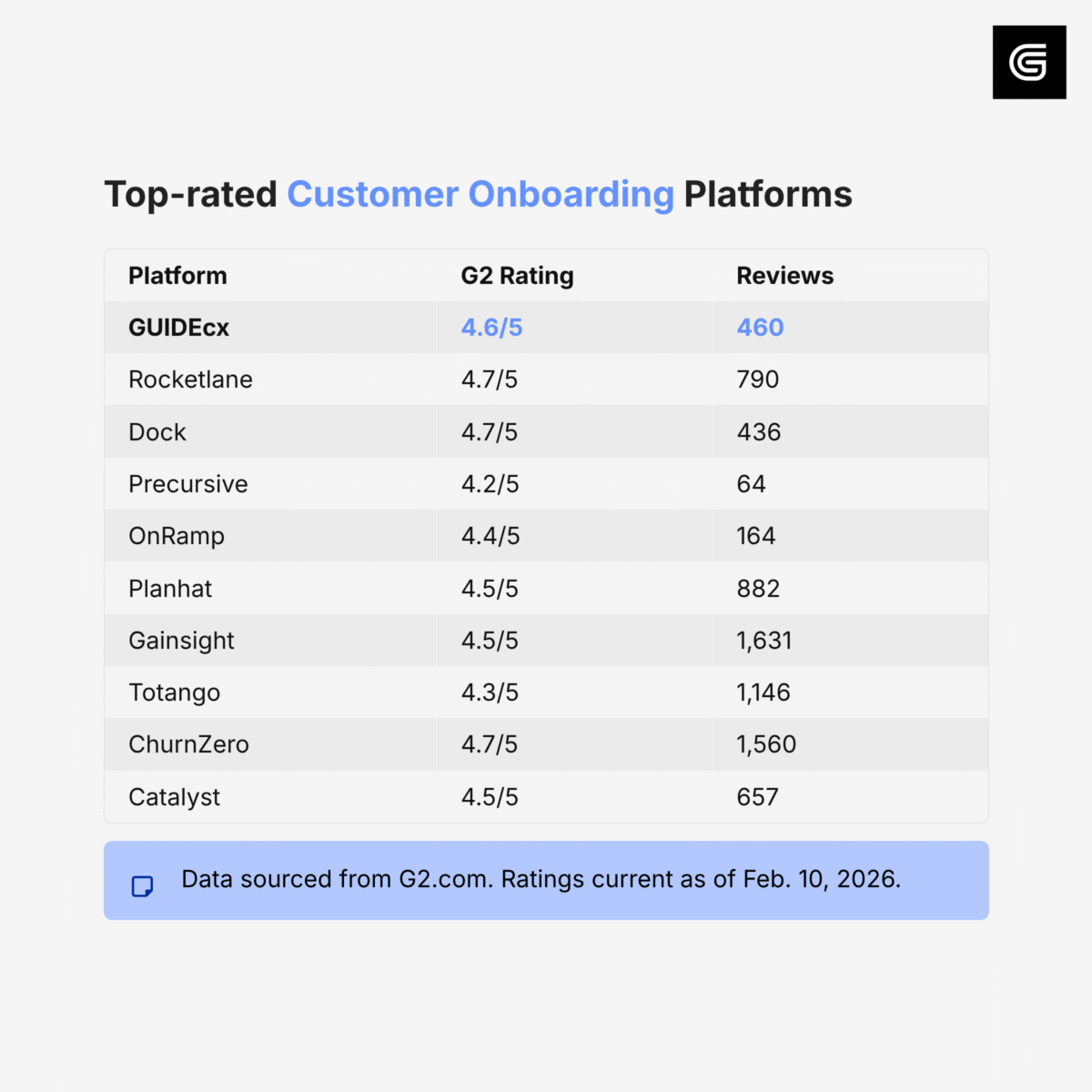
Third-party Ratings:
Across our top 10, here’s how reviewers on G2 scored each platform:
Conclusion
There is no single “best” customer onboarding platform, only the best platform for how your organization actually delivers onboarding.
Teams that prioritize customer-facing transparency and predictable delivery will gravitate toward GUIDEcx. Professional services-led organizations that care deeply about utilization, staffing, and margins will find Rocketlane or Precursive a stronger fit. Companies that run onboarding primarily through Customer Success will get more value from Planhat, Gainsight, or Totango. And teams shifting toward product-led motions should look closely at Pendo.
The right tool ultimately depends on whether your onboarding motion is people-led, process-led, or product-led, and choosing accordingly will make all the difference.

- How to Use MCP with the GUIDEcx API for AI-Powered Customer Onboarding – September 4, 2026
- How to Reduce Manual Work in Customer Onboarding – August 31, 2026
- Introducing the State of Customer Onboarding in 2026: All New Report – August 17, 2026