

A problem we hear about frequently from onboarding leaders this year is customers who don’t show up.
You’ve put the kickoff on the calendar, built a solid agenda, and sent the invite with a friendly note. Then it’s you, a colleague, and an empty Zoom room, or the customer’s champion joins ten minutes late with their camera off and clears their inbox while you walk through slide four.
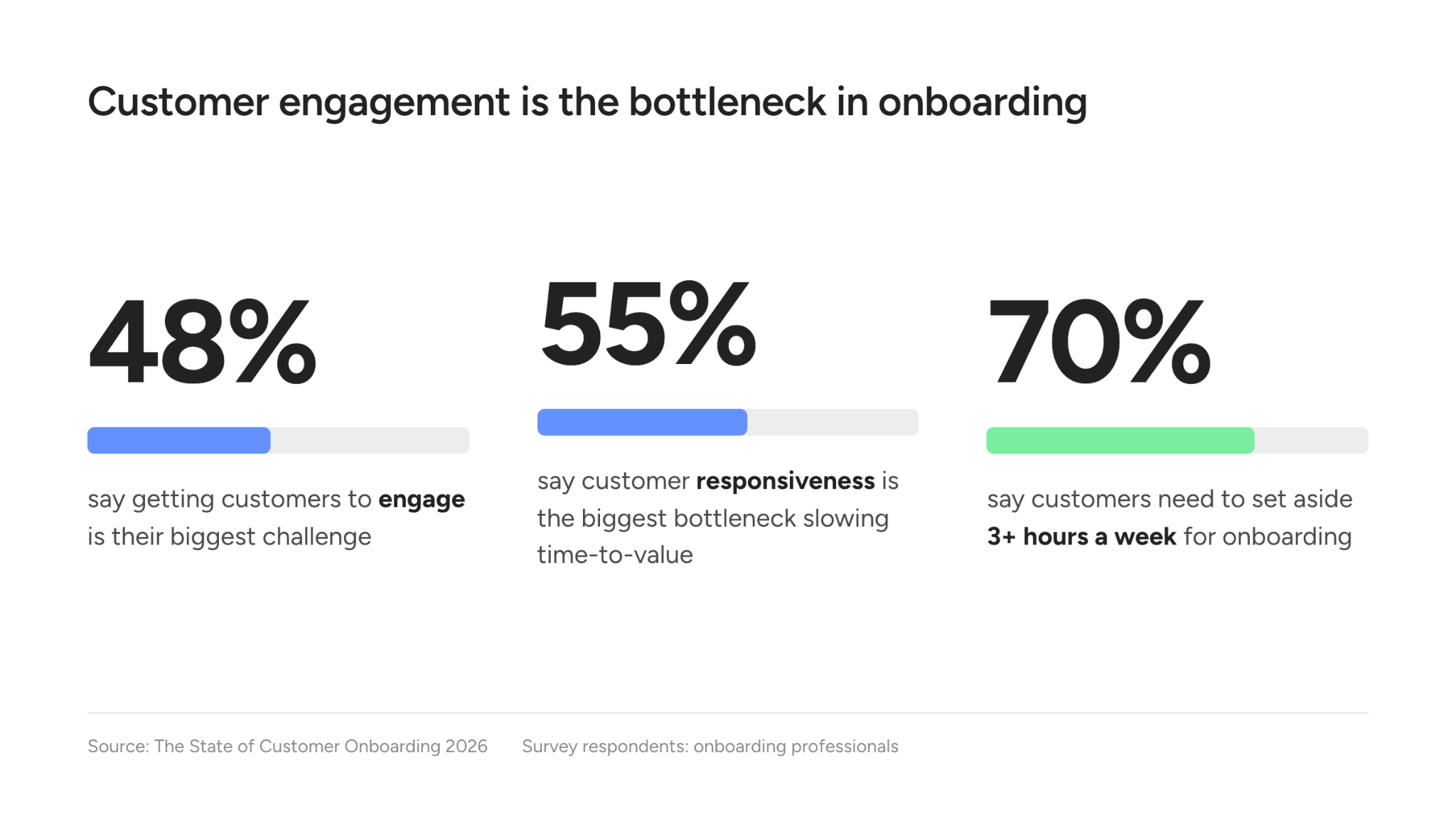
It’s easy to read that as a customer who doesn’t care, but the more common explanation is overload. In our State of Customer Onboarding in 2026 research, 48% of onboarding professionals said getting customers to engage is their biggest challenge, and 55% said customer responsiveness is the biggest bottleneck slowing time-to-value. At the same time, 70% said their customers need to set aside at least 3 hours a week for onboarding. For a champion who is still carrying their normal workload, that’s most of an afternoon taken out of a calendar that was already full.
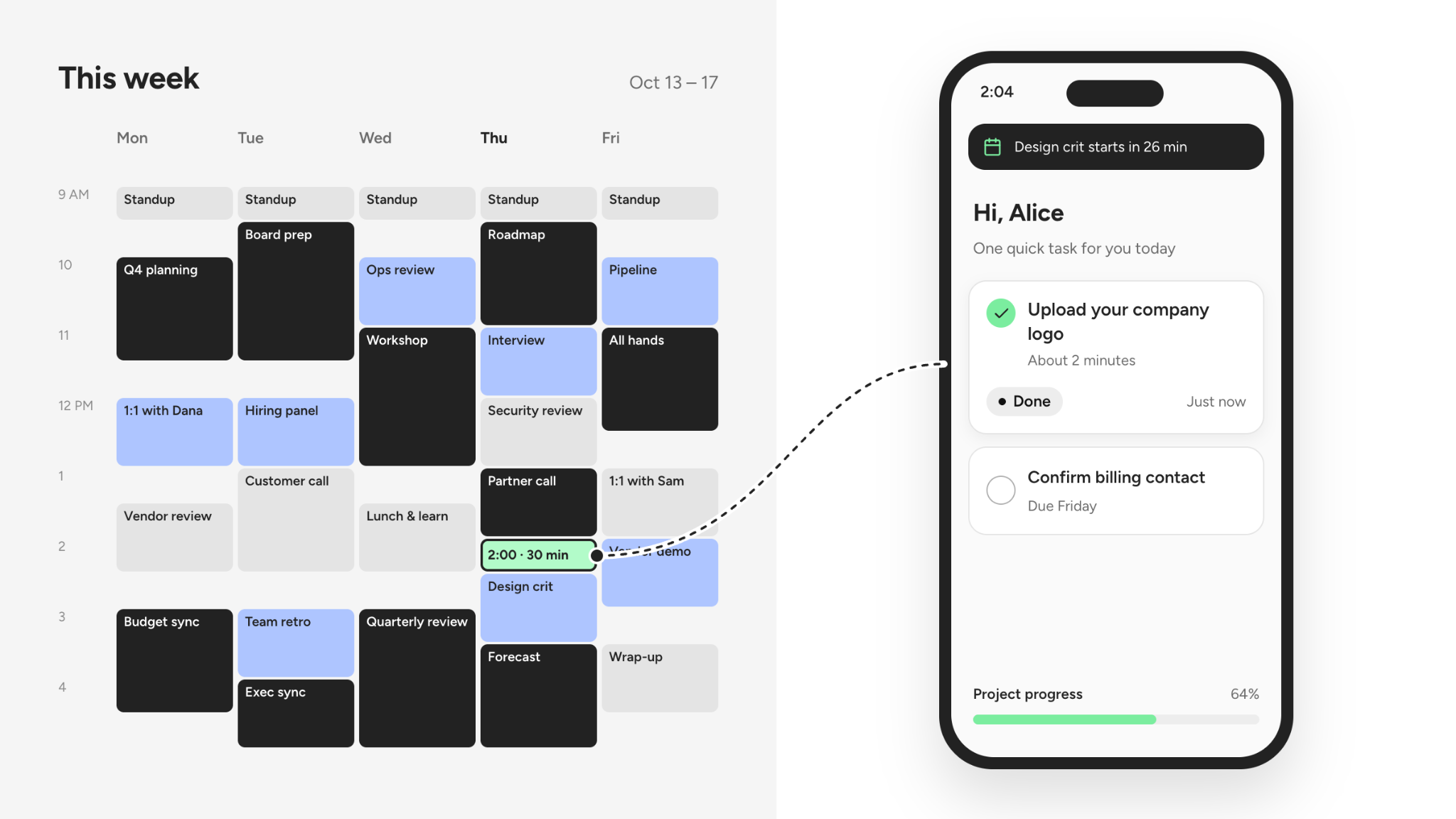
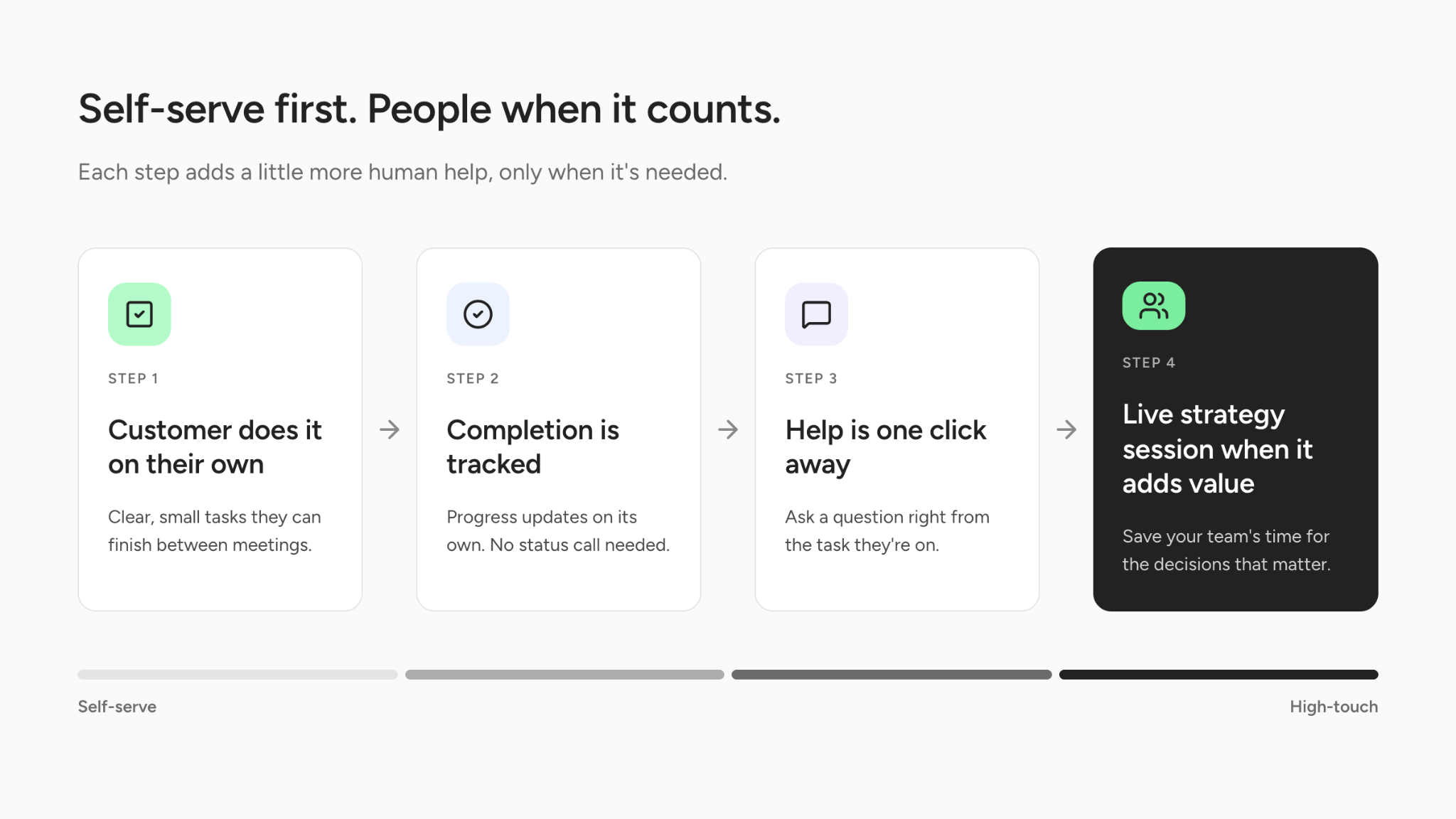
Customer engagement and meeting attendance aren’t the same thing. The teams getting better results stop making the kickoff call the gate every customer has to pass through first. They hold short live conversations for goals, tradeoffs, and stakeholder alignment, and they move setup, data collection, and product training into self-serve steps customers can finish between meetings.
The sections below cover which onboarding steps work well async, how to build a hybrid process that still feels personal, and what to measure once kickoff attendance is no longer the headline metric.
What is asynchronous customer onboarding?
Asynchronous customer onboarding is an approach where customers complete onboarding steps on their own schedule, through guided tasks, short videos, interactive walkthroughs, and checklists, instead of waiting for the next scheduled call. Most teams use it as part of a hybrid model: async for repeatable setup and training, live time for strategy, use-case design, and decisions.
An onboarding manager still owns every async project, watches task-level progress, and steps in when a customer gets stuck. The customer just doesn’t have to wait for the next call to make progress.
Why are customers skipping onboarding calls?
Mostly because their calendars are already full, and a 45-minute call is the hardest thing on your onboarding plan to say yes to.
Microsoft’s Work Trend Index research on the “infinite workday” found that the average worker is interrupted every 2 minutes by a meeting, email, or chat notification, which adds up to roughly 275 interruptions a day. The same research found people receive about 117 emails and 153 Teams messages on a typical workday, and your kickoff invite has to compete with every one of them.
In a September 2026 r/CustomerSuccess thread about getting SaaS customers to show up for onboarding, one onboarding pro suggested treating low attendance “as a signal that not every customer wants the same onboarding format.” Another commenter in the same thread, who builds an email-based onboarding product (so read it with that in mind), argued that customers signed up to get something done, not to add another meeting, and that teams should stop making “book a call” the very first step.
Customers also can’t see where onboarding stands. Nearly 60% of the onboarding professionals in our 2026 research said their customers don’t have a dedicated view of onboarding progress, and 73% said email is their primary way of interacting with customers. With the plan scattered across email threads, the kickoff becomes the one place a customer can find out what’s next, so a single missed meeting leaves them without a plan.
Is low onboarding attendance a bad sign?
Not necessarily. A missed kickoff tells you the customer didn’t join a meeting. It doesn’t tell you whether they’re disengaged, busy, confused, or quietly getting the work done on their own.
It helps to separate a stalled project from a stuck one. A project is stalled when progress has stopped, and stuck once you know why. The reasons usually fall into six buckets:
- The customer is self-serving and moving fine, just not attending calls.
- They opened the instructions but couldn’t finish the task.
- They haven’t engaged at all yet.
- They’re waiting on someone else inside their own organization.
- Something is blocked on your side, like a dependency or a teammate with too much on their plate.
- The onboarding format simply doesn’t fit how this customer works.
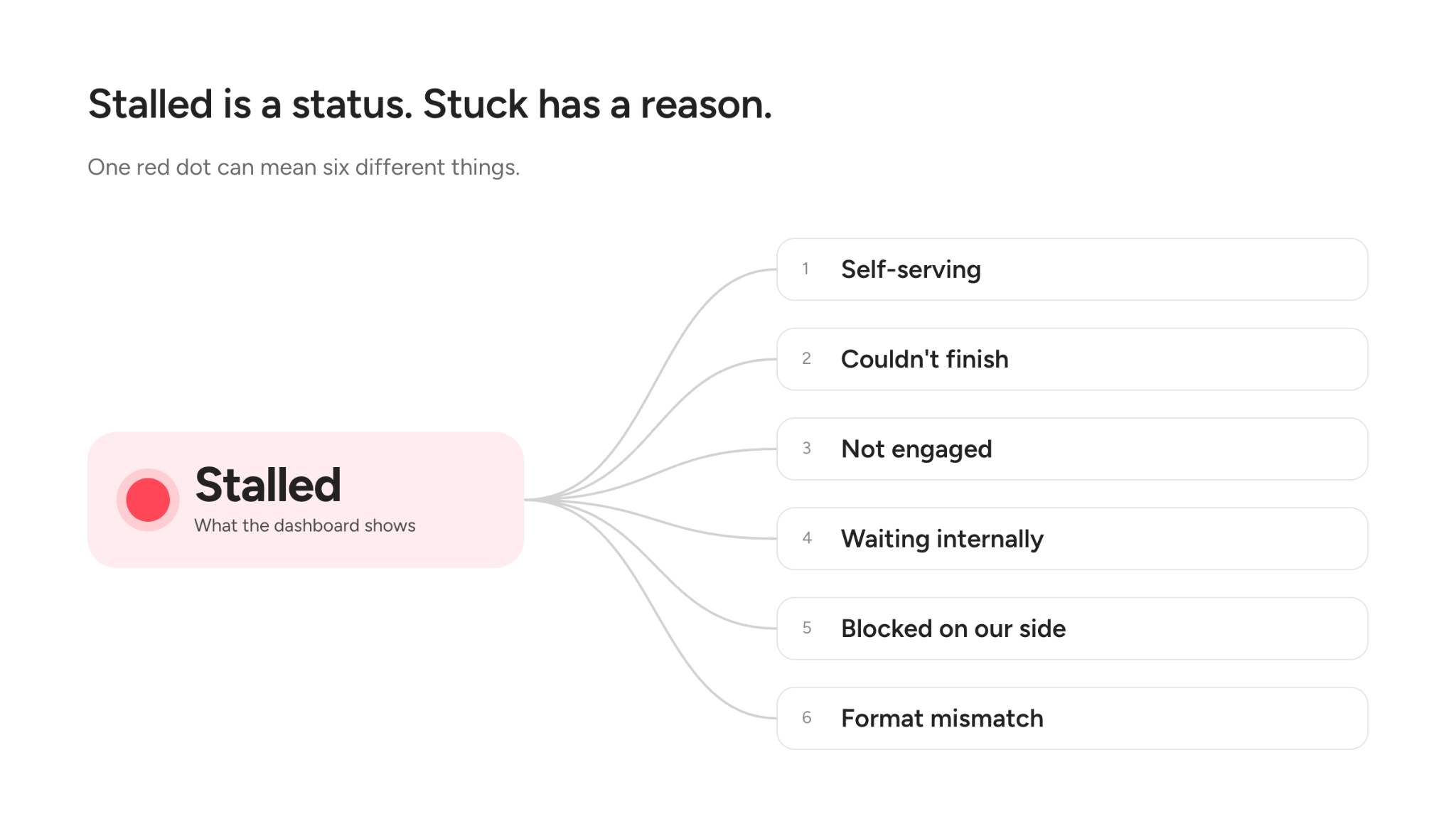
Each needs a different fix. A customer waiting on their own IT team needs help finding the right internal owner, while one who opened a task and quit usually just needs the walkthrough for that step. Neither problem is solved by another meeting on their calendar, and a blocker on your side isn’t a customer problem at all.
Pull the list of customers who skipped or postponed kickoff last quarter and check how many still went live on schedule. If a meaningful share did, those customers found a self-serve path through your onboarding on their own, which means the path exists and your team hasn’t designed it yet.
Which onboarding steps should be async and which should be live?
If a step works the same way for every customer, make it async. If it depends on this customer’s goals, internal politics, or tradeoffs, it belongs in a live conversation with your team.
| Onboarding step | Best format | Why |
|---|---|---|
| Account setup, user invites, basic configuration | Async, with a short how-to video or walkthrough | It’s the same for nearly every customer |
| “How do I do X?” product training | Async: recorded demos, interactive walkthroughs, help articles | Customers can rewatch it whenever they need it |
| Collecting files, data, and approvals | Async tasks with clear owners and due dates | Nobody needs a meeting to upload a spreadsheet |
| Routine status updates | Async, through a customer portal or automated summary | Customers can check progress without asking |
| Goals, success criteria, and use-case design | Live | It takes real conversation and judgment |
| Integration or migration decisions with tradeoffs | Live, short and focused | The stakes are high and questions come up fast |
| Stakeholder misalignment or escalations | Live | These are relationship problems, not task problems |
| Go-live readiness and sign-off | Live or hybrid | Worth a moment of shared confidence |
This lines up with the way we suggest thinking about reducing manual work in customer onboarding: automate and standardize the high-frequency, low-judgment work, and protect human time for the moments where judgment changes the outcome.
How do you build a hybrid onboarding process?
Most teams can get there by reworking the playbook they already have, roughly in this order.
- Start with value milestones, not meetings. Map the shortest path from signed contract to the first point where the customer gets value from your product, such as a first workflow running in production or a first report their leadership reads. Give each milestone along that path an owner and a format, and add a meeting only where it helps a customer reach one.
- Replace “book a call” with a quick win. Instead of opening with a scheduling link, open with one small task a customer can finish in a few minutes, like connecting an account, inviting a teammate, or uploading a file. A customer who has already connected an account shows up to the strategy conversation with their own data in the product, which gives you something concrete to plan around.
- Keep the kickoff, but make it shorter and more strategic. If setup basics are already handled async, the live session can focus on the customer’s goals, success criteria, and which use case goes live first. Send light prework, like a short goals form, so the call starts with answers instead of introductions.
- Put training right where customers need it. Attach the short video, walkthrough, or help article to the specific task it explains. Customers shouldn’t have to dig through a resource library to figure out one step.
- Give customers one place to see what’s next. A customer-facing portal with tasks, due dates, and status answers most “where are we?” emails before anyone has to send them. With persona-based experiences, each stakeholder sees only what’s relevant to them. And if you’d rather onboarding feel like part of your own product, GUIDEcx’s Embedded Onboarding Portal lets you place the customer portal inside your website or app, with notification emails linking back there too.
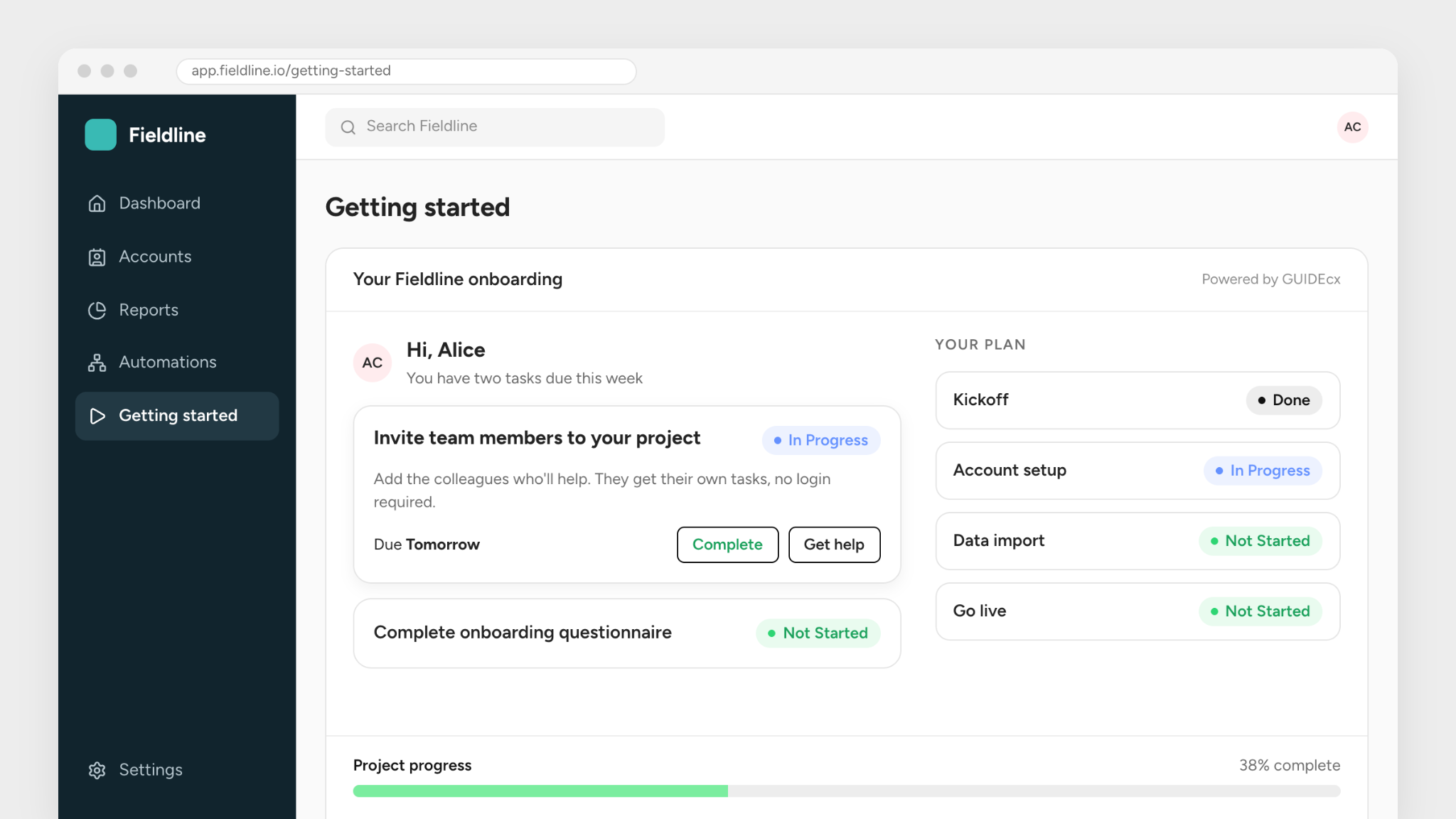
- Follow up based on what customers do, not just the calendar. “Send a reminder after seven days” is a start. “When a customer finishes the prerequisite, unlock the next step; when they open a task but don’t finish it, send the walkthrough” is better. Automated engagement should react to real customer activity whenever it can.
- Decide ahead of time when a human steps in. Write down the triggers that should prompt a personal check-in, like a task blocked for several days, no activity after a key milestone, or a new stakeholder joining late. That way async never turns into “nobody’s watching.”
How do you keep customers engaged in self-serve onboarding without it feeling robotic?
The biggest risk with async onboarding is that it starts to feel like nobody’s on the other end. Four habits prevent most of that.
- Write like a person. Automated messages should sound like they came from the human who owns the project, with their name on them. A reminder that says the SSO setup is the last thing blocking the customer’s pilot gets read, while a generic “Action required” email gets archived.
- Make it easy to raise a hand. Every self-serve task should have an obvious way to ask for help, whether that’s a comment thread, a chat, or a link to grab 15 minutes. Customers will try things on their own when they know they won’t get stranded.
- Let customers choose their path. Some customers want a live walkthrough, and others would rather click through it at 9 p.m. with a cup of tea. Ask which they prefer in the welcome email and route them into the matching track from the start.
- Don’t drop the relationship. In our research, 68% of onboarding professionals said a typical project involves at least 4 stakeholders. That kind of onboarding complexity still needs someone who knows which stakeholder signs off on the integration plan and which one just needs a weekly update.
How do you measure whether async onboarding is working?
Start by retiring kickoff attendance as your headline engagement metric. It measures whether customers came to a meeting, not whether they’re moving toward value. Here’s what we’d track instead:
- Time to first value and time to each key milestone
- Task completion rates, compared across async and live steps
- How long a task sits after a customer first opens it
- The share of customers who complete self-serve steps without needing help
- Why projects stall, using the buckets above, so patterns become visible
- Whether stalls are coming from the customer side or your own team’s capacity
Teams tend to underweight that last metric. A project can stall with a fully ready customer because the implementation lead is carrying too many go-lives at once. Advanced reporting and resource management help you see both sides of the project, so you’re not blaming customers for a delay that started on your side. If shrinking time-to-value is the goal, both sides have to be visible.
What does a modern customer onboarding experience look like?
It looks less like a series of meetings and more like a clear path. Customers know what’s next, can do much of it on their own time, and get a person on the call when a decision, tradeoff, or blocker needs one.
The shift starts with the question your team plans around. The old one was, “How do I get customers to follow my process?” The better one is, “How do I design the process around the way each customer will actually make progress?”
If you’re not sure where your current process stands, our Customer Onboarding Health Check is a good place to start. And if you’d like to see how GUIDEcx helps teams run hybrid onboarding at scale, book a demo and we’ll walk you through it.
Frequently asked questions about asynchronous customer onboarding
What is asynchronous onboarding?
Asynchronous onboarding lets customers complete onboarding steps on their own schedule through tasks, videos, walkthroughs, and checklists rather than scheduled calls. It’s usually paired with short live sessions for strategy and decisions, which is often called a hybrid onboarding model.
Is asynchronous onboarding better than live onboarding?
Neither is better on its own. Async works best for repeatable setup and product training, while live sessions work best for goals, use-case design, tradeoffs, and relationship issues. Most teams get the best results by combining the two.
Why don’t customers show up to onboarding calls?
Usually because they’re overloaded, not uninterested. Microsoft’s Work Trend Index research found workers are interrupted roughly 275 times a day by meetings, email, and chat. Low attendance is often a sign the onboarding format doesn’t fit how the customer works.
How do you get customers to complete onboarding tasks?
Make the first task small and quick to finish, attach help right where it’s needed, give customers one place to see what’s next, and trigger follow-up based on what they actually do. Make it easy to ask for help so customers don’t stall quietly.
How should you measure customer onboarding engagement?
Measure progress, not attendance. Track time to first value, milestone completion, how long tasks sit after customers open them, how many customers self-serve successfully, and the reasons projects stall.
What’s the difference between a stalled and a stuck onboarding project?
A stalled project has stopped making progress. A stuck project is one where you know why, whether the customer is busy, confused, waiting on a colleague, or blocked by something on your side. Knowing the reason tells you the right next step.
What tools do you need for asynchronous onboarding?
At minimum, you need a way to assign customer tasks with clear owners and due dates, a customer-facing view of progress, self-serve training content, and automated follow-up. An onboarding platform like GUIDEcx brings those together so your team can see every project in one place.

- How to Build an Asynchronous Customer Onboarding Process Customers Actually Finish – October 22, 2026
- How to Manage Multiple Stakeholders During Customer Onboarding – September 22, 2026
- How to Track Project Health in Customer Onboarding – September 9, 2026