

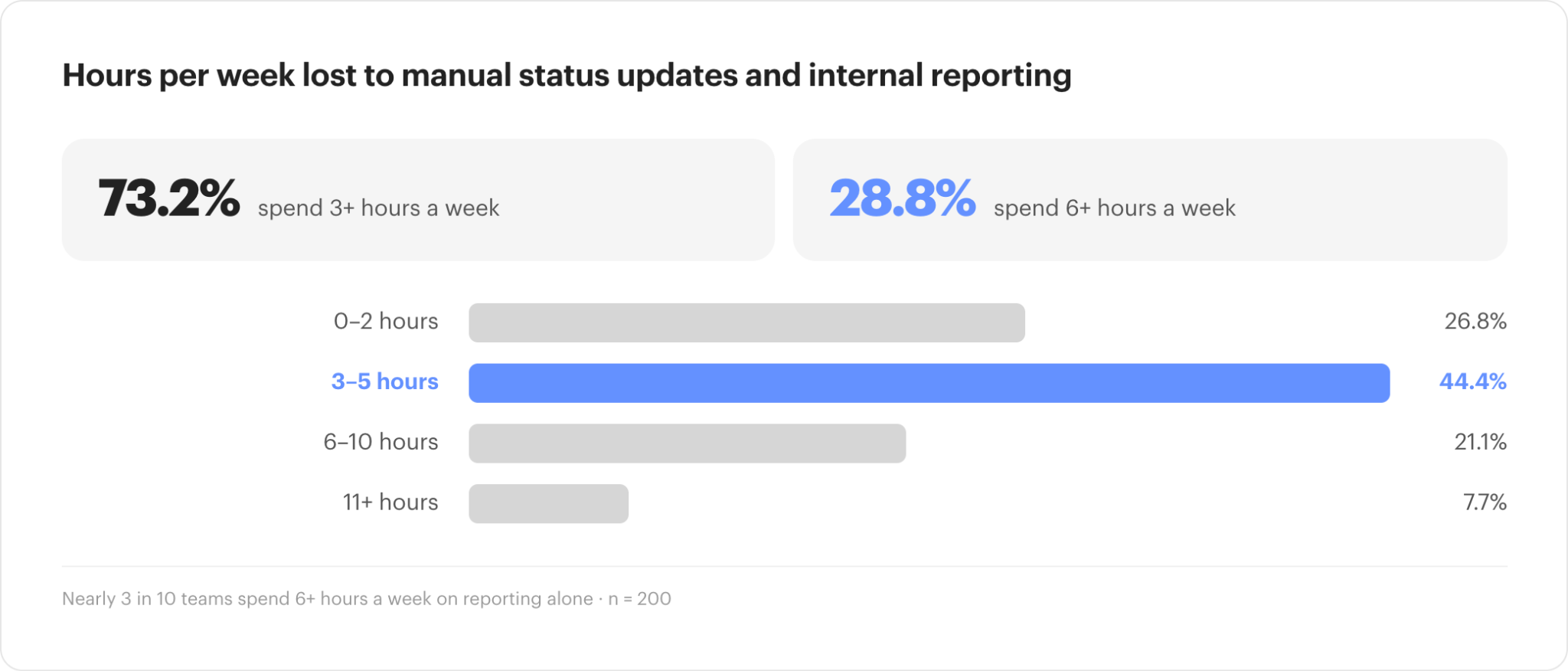
In our State of Customer Onboarding in 2026 research, 28% of onboarding professionals said they spend more than six hours every week on manual status updates and internal reporting. Across the full group, 72% spend at least three hours a week on the same work.
For an onboarding leader, six hours a week represents capacity that their team can’t instead use to manage a difficult implementation, coach up a project manager, improve a playbook, or take on another customer.
As the organization grows, this is an increasingly expensive problem. A ten-person implementation team losing six hours per person to reporting and status work gives up 60 hours of delivery capacity every week. Adding customers without changing the underlying process usually means adding more coordination work along with them.
Where does all of that manual work come from? Much of it stems from a familiar set of operating gaps, like project information living across several different systems, customer responsibilities needing to be chased manually, and updating project statuses.
So to us, reducing manual work starts by removing those coordination requirements from the team wherever possible in your process. Let’s walk through exactly where onboarding teams are losing time to manual work in their process and some practical steps to improve that.
How much time do customer onboarding teams spend on manual work?
Nearly 3 in 10 of the onboarding professionals we surveyed spend 6+ hours each week on manual status updates and internal reporting. Another 44.4% spend between 3 and 5 hours.
When projects are low-volume, that’s a pretty manageable workload. But at scale, it’s a glaring weakness for an onboarding team’s efficiency.
And most teams are operating at a relatively high volume of new customers. More than half of the teams in our research onboard between 6 and 50 new customers each month, while roughly 1 in 5 handles more than 100. At those volumes, even a small manual requirement repeated across every implementation becomes a material draw on team capacity.
Consider status reporting alone. If 8 implementation managers each spend 4 hours a week assembling updates, leadership is using 32 hours of skilled delivery time to understand work the organization is already performing.
There is also an opportunity cost. In many cases, the operators responsible for this manual work are the same ones responsible for moving customers toward go-live, navigating technical dependencies, managing customer stakeholders, and intervening when projects are delayed. Every recurring administrative task competes with those responsibilities.
Why is customer onboarding still so manual?
Customer onboarding is distributed across more organizational and system boundaries than many teams account for when they design the process.
In fact, we found that 74% of customer onboarding professionals use a CRM, 46% use shared spreadsheets, and 44% use Slack or a similar communication tool. On top of that, 73% told us they primarily use email to interact with customers.
Multiple systems are often a necessary evil but can be a big driver of inefficiency when information between those systems moves through people instead of syncing automatically. In many cases, that’s exactly what’s happening.
Nearly 20% of respondents said their onboarding technology does not integrate well. Another 25% said tasks and follow-ups are not automatically managed or tracked, while 14% said their reporting lacks clear insights.
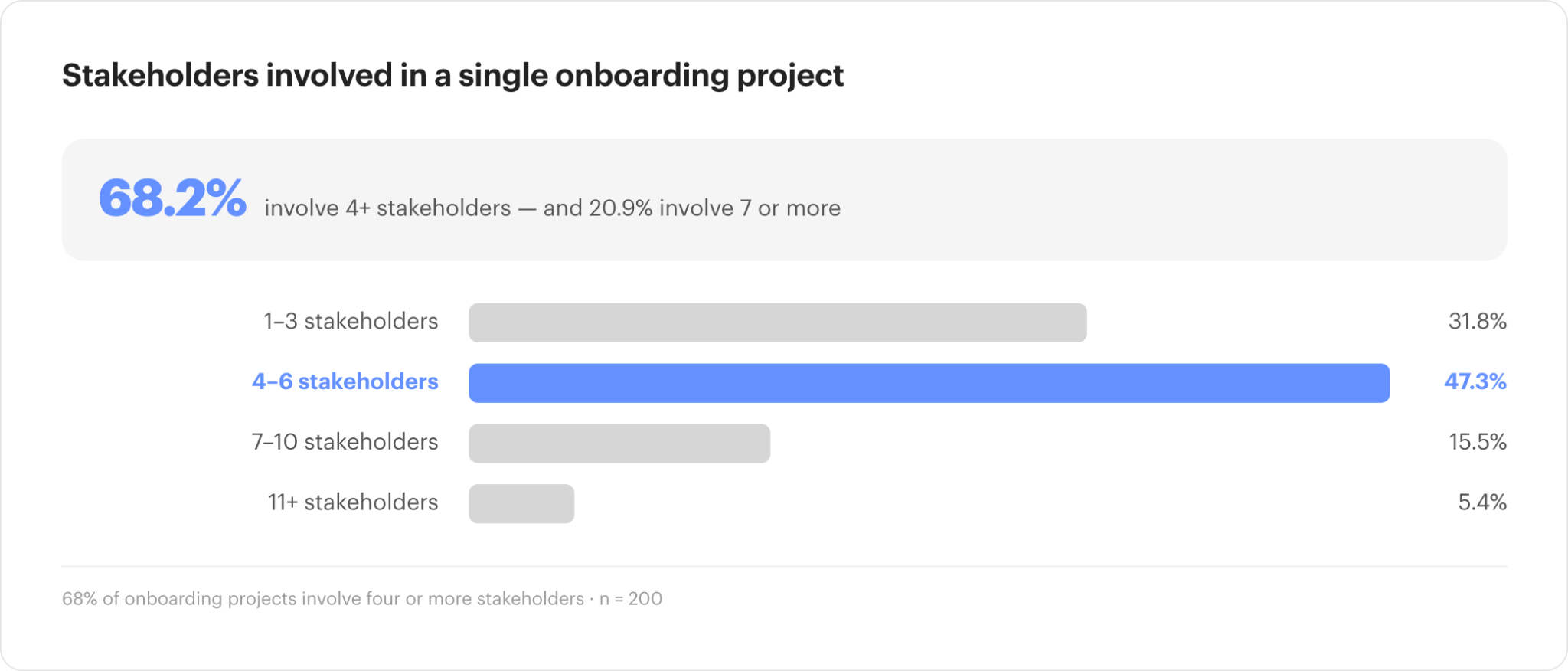
The projects themselves also require significant coordination. 68% of respondents said at least four stakeholders are involved in a typical onboarding project, and roughly 1 in 5 manages 7 or more internal and customer-side stakeholders.
Take stock of what a typical project manager is coordinating in this environment: multiple systems that don’t integrate well, multiple internal and external stakeholders, and the manual work required to hold it all together. Ultimately, customer onboarding remains a manual endeavor for many teams because of the coordination required by the individuals managing it and the systems many are using to support their operations.
Naturally, customer onboarding as a function is embracing AI and automation to help. But let’s talk about what they should focus on automating.
What manual tasks should customer onboarding teams automate first?
Start with work that happens frequently across the portfolio and follows a consistent rule. The good news is that much of the work in customer onboarding is repeatable.
Project creation is a good example of repeatable work. Once a deal closes, the implementation team should not need to manually recreate customer information, scope, stakeholders, or other details already captured by Sales in the CRM.
The same principle applies during delivery. Tasks can be assigned from project templates, reminders can fire when customer work becomes due, dependencies can move the project forward, and milestone data can flow back into the CRM or CS platform without a project manager maintaining each system separately.
For most onboarding organizations, the best candidates for automation fall into the following areas:
- Project creation and transfer of Sales context into implementation
- Task assignment, dependencies, and repeatable workflow steps
- Customer reminders for outstanding work and approvals
- Milestone and status updates across connected systems
- Recurring project and portfolio reporting
- Internal notifications when projects move outside expected parameters
Of course, there are a couple of caveats.
Firstly, frequency matters. Saving five minutes on an action that happens several times on every implementation can create more capacity than automating an elaborate workflow that occurs once a quarter.
Secondly, judgment matters. The more a task depends on customer context, interpretation, or relationship management, the less likely it should be fully automated. A late task can trigger a reminder automatically. Deciding why the customer is falling behind may require an experienced implementation manager.
A useful way to prioritize is to look at frequency and judgment together:
| Low judgment required | High judgment required | |
| High frequency | Automate first. Reminders, project creation, routine updates, reporting | Assist, don’t fully automate. Risk identification, summaries, suggested next steps |
| Low frequency | Automate later. Useful, but lower impact on capacity | Keep human-led. Escalations, change management, complex customer decisions |
How can onboarding teams reduce time spent on status updates?
Manual status reporting usually signals that the people who need project information cannot access or trust it directly. Only 9% of onboarding professionals in our research said they have a single, reliable, real-time view of project health across their portfolio. 47% said their view still requires manual validation, while another 29% said the information is spread across several tools.
Their customers also can’t see what’s going on. Nearly 60% of respondents said their customers do not have a dedicated view of onboarding progress.
That lack of visibility creates work in both directions.
Internally, leaders rely on project managers to translate project activity into portfolio reporting. Externally, customers rely on the same team to tell them what has been completed, what remains outstanding, and whether the implementation is still on track.
A better operating model captures project status as a byproduct of the project itself. Tasks, milestones, dependencies, customer activity, and timing already contain most of the information needed to understand project progress. When those signals are current and accessible, leadership can inspect the portfolio without asking managers to reconstruct it first, while customers can answer routine progress questions without another email or meeting.
How do you reduce manual onboarding work without making onboarding impersonal?
Automation works best when it protects the parts of onboarding where experienced people make a meaningful difference.
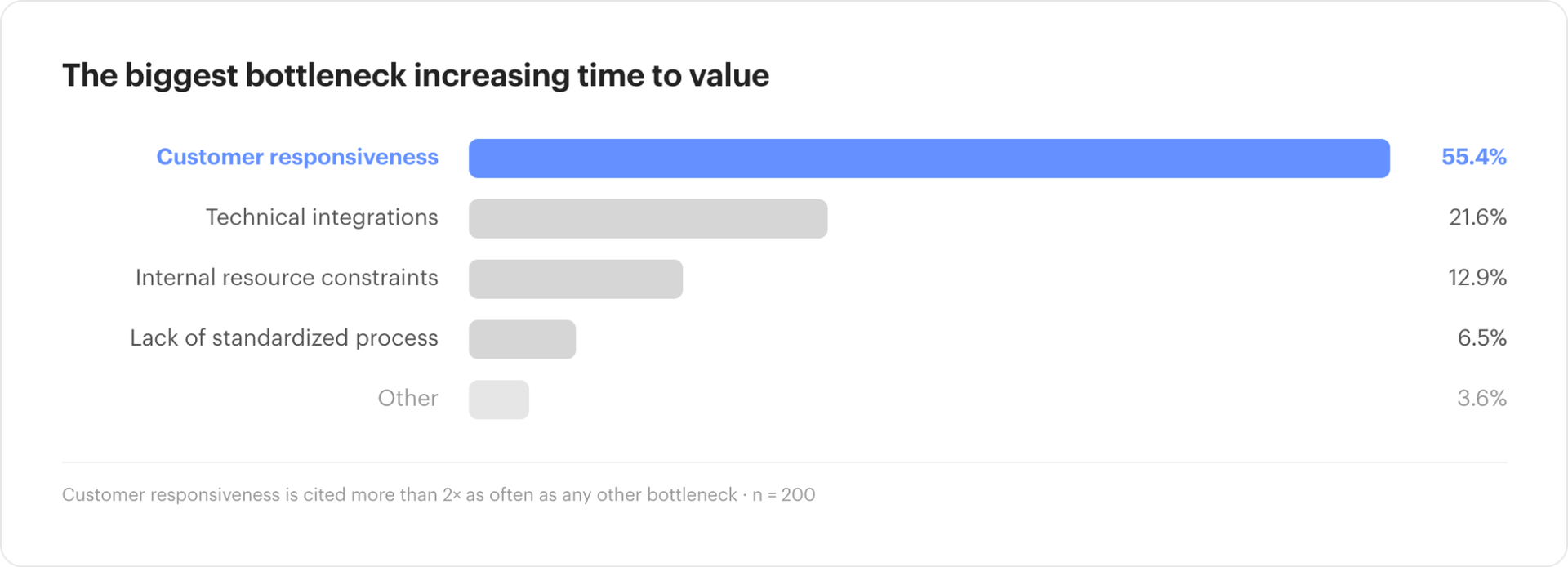
Customer engagement remains the biggest challenge reported by onboarding professionals. 48% named getting customers to engage as their largest problem, and 55% said customer responsiveness is the biggest bottleneck increasing time-to-value.
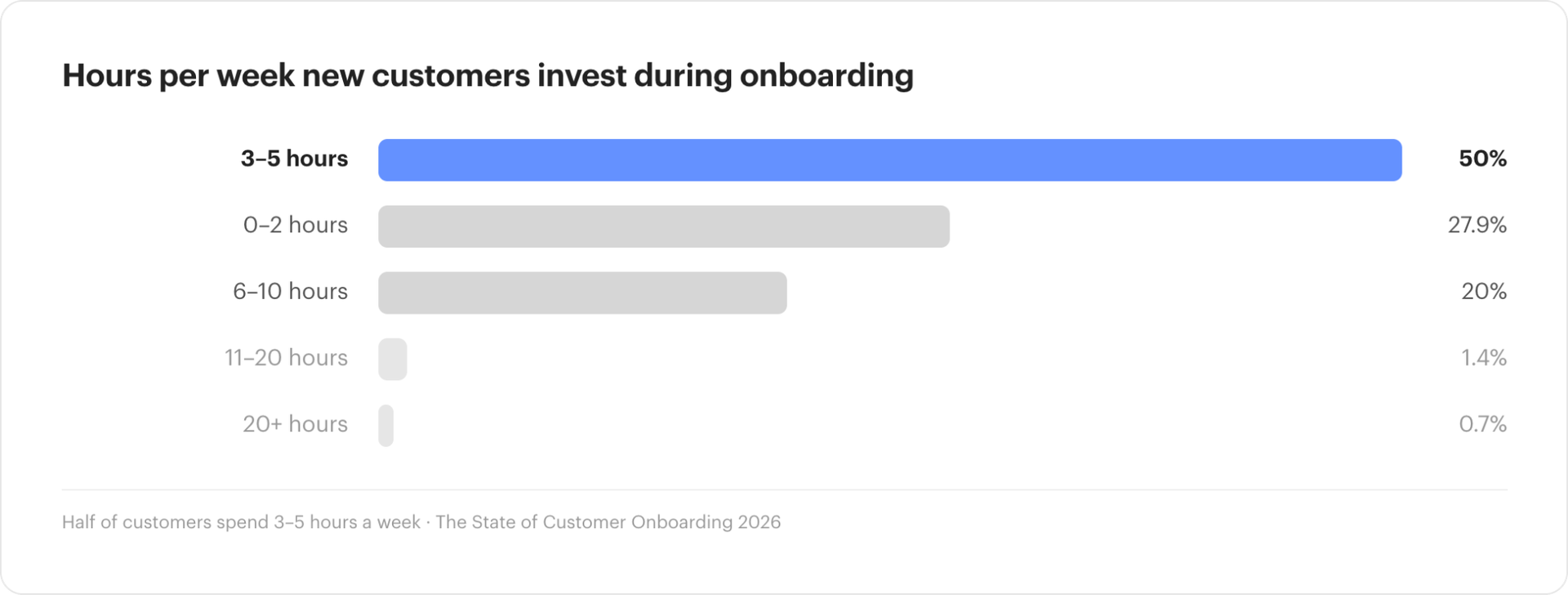
Customers are also being asked to contribute significant time. 70% of respondents said customers need to devote at least 3 hours per week to onboarding, including 20% who require 6 to 10 hours.
Those conditions create situations where human judgment matters. A stakeholder who misses a routine task may only need an automated reminder, while a stakeholder who repeatedly goes quiet because their organization has not aligned internally needs a different response.
For leaders, the practical line to draw is around judgment. Automate predictable coordination, the movement of information, and routine follow-up. Preserve team capacity for change management, stakeholder alignment, technical problem-solving, expectation management, and conversations that can materially change the direction of a project.
The result should be more attention available for customers who actually need it, rather than more communication delivered indiscriminately to everyone.
Can AI automate customer onboarding?
AI can already remove useful amounts of administrative work from onboarding, but most organizations are still early in determining where it belongs.
46% of respondents in the State of Customer Onboarding in 2026 reported that AI automation is their top onboarding priority for the next 12 months, by far the biggest cited priority we heard. The next most common priority, developing a standardized playbook, was selected by 14%.
While onboarding teams are ambitious about AI, their actual adoption of it is much less mature. 54% described their AI use as experimental or ad hoc, while 39% said they are using it to automate internal tasks.
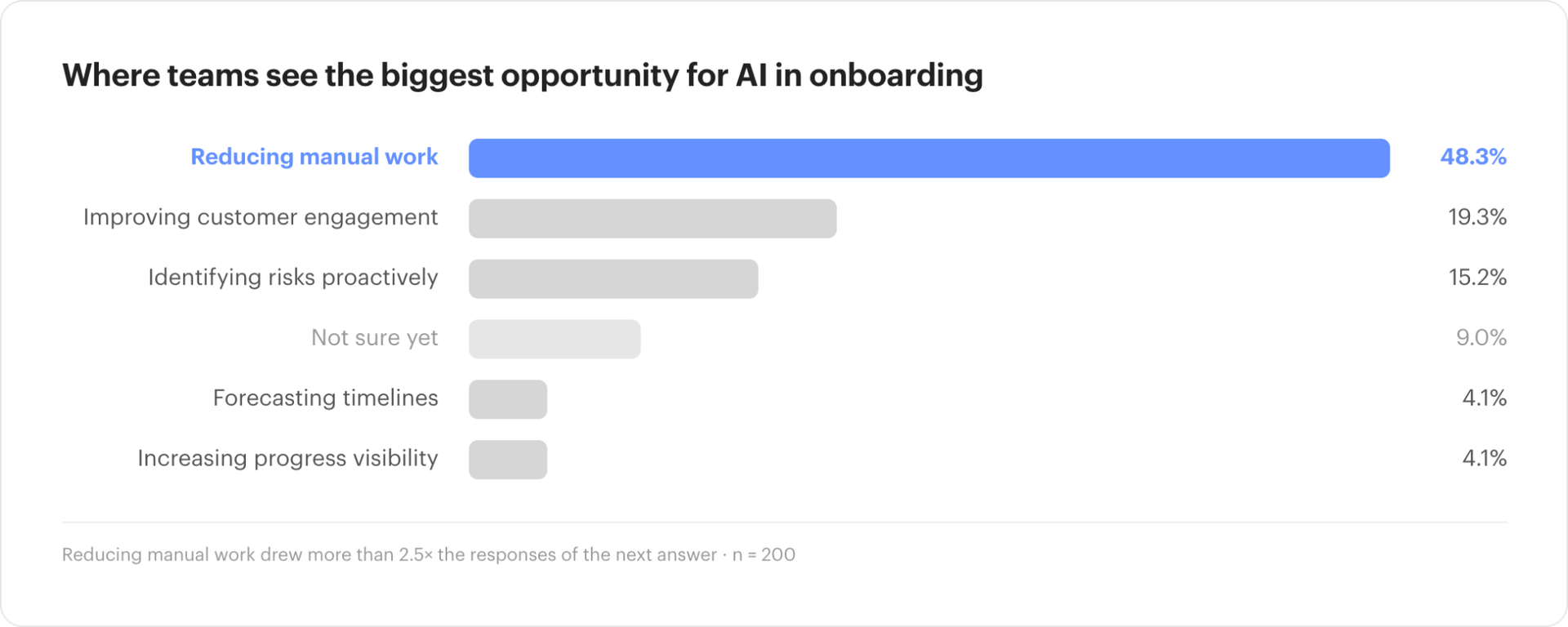
When we asked where AI could create the most value, 48% unsurprisingly chose reducing manual work. Improving customer engagement came in well behind it at 19, despite being the top cited challenge.
That prioritization makes sense given the current state of onboarding operations. Summarizing project activity, finding relevant context, surfacing unusual patterns, drafting internal updates, and identifying projects that need review are all areas where AI can reduce the amount of information a manager has to process manually.
But AI’s usefulness depends heavily on the quality of the underlying project data.
An AI agent trying to identify at-risk implementations needs current information about project progress, customer activity, deadlines, stakeholders, and dependencies. If those signals are split across a CRM, inbox, spreadsheet, and project plan, the AI inherits the same visibility problem the team already has.
For onboarding executives considering AI investments, improving the delivery data underneath the process may matter as much as choosing the AI capability sitting on top of it.
At GUIDEcx, this reality is top of mind. For years, we’ve been intensely focused on perfecting the infrastructure for AI to be effective in our platform, including surfacing machine-readable data that agents can parse, implementing real error handling protocol that agents can act on, and rate limits that are built to handle concurrent agent traffic.
What does a more automated customer onboarding process look like?
A mature onboarding operation supported by automation removes much of the manual coordination between the major stages of delivery.
In practice, a more automated onboarding operation feels less dependent on people keeping the process stitched together by hand. Information carries forward from the sale, the right work starts with less setup, customers have a clearer view of what they need to do, and progress is reflected across the systems other teams rely on.
For leaders, the bigger benefit is visibility without the reporting burden. Project health, timing changes, and emerging risks are easier to see as the work happens, so managers can spend more time on the projects that need intervention and less time collecting updates just to understand the portfolio.
As volume grows, this becomes a capacity issue. If each new customer brings the same amount of manual coordination, follow-up, and reporting, the team eventually has to add headcount just to keep pace. A stronger operating model lets more work move through the organization without increasing administrative effort at the same rate.
A more automated process gives leaders another option. More volume can move through the same team because a smaller share of each project requires manual administration.
How much time could customer onboarding automation save?
There is no useful universal benchmark for hours saved because the answer depends on project volume, complexity, tooling, and how much work the team is performing manually today.
But we do have a tool that tells you how much time and revenue inefficient onboarding is costing you. Try it out here.
Frequently asked questions about customer onboarding automation
What is customer onboarding automation?
Customer onboarding automation uses workflow rules, integrations, and AI to handle repeatable parts of implementation, including project creation, task assignment, customer reminders, milestone updates, data synchronization, and reporting.
What customer onboarding tasks should be automated first?
Start with high-frequency activities that follow a consistent rule across projects. Project creation, recurring reminders, task dependencies, system updates, and portfolio reporting often create meaningful savings without removing human judgment from the customer experience.
How much manual work do customer onboarding teams do?
In GUIDEcx’s 2026 survey of 200 onboarding professionals, 28% said they spend six or more hours each week on manual status updates and internal reporting. 72% spend at least three hours.
Can AI reduce manual work in customer onboarding?
Yes. 48% of onboarding professionals in our research identified reducing manual work as the biggest opportunity for AI in their onboarding process. Current adoption remains early, with 54% describing their use as experimental or ad hoc.
Why does customer onboarding become difficult to scale?
Each implementation creates coordination across customer stakeholders, internal teams, deadlines, dependencies, and systems. When those connections are maintained manually, administrative workload rises alongside customer volume and eventually consumes delivery capacity.
How can onboarding leaders reduce manual reporting?
Capture project status directly from live delivery activity and make that information accessible to the people who need it. Leaders should be able to inspect portfolio health, while customers and downstream teams should be able to see relevant project progress without relying on a project manager to prepare a separate update.

- How to Use MCP with the GUIDEcx API for AI-Powered Customer Onboarding – September 4, 2026
- How to Reduce Manual Work in Customer Onboarding – August 31, 2026
- Introducing the State of Customer Onboarding in 2026: All New Report – August 17, 2026